
Google My Business is a free tool for professionals comprising an interface with a dashboard for managing the visibility of a local business. Google My Business and Google Maps, as well as the associated “classic” search results, are part of Google’s local search.
Today, we are going to learn how to optimise your Google My Business listing to improve your local SEO. Feel free to share this simple and comprehensive article!
Note: over the past few months, Google has renamed GMB to Google Business Profile (GBP).
What Is Google My Business For
What is Google My Business for? To improve your local SEO? Certainly. But it also allows you to display your business listing in local searches or on Google Maps.
You have certainly already seen these GMB listings while browsing Google. Here are the 3 possible display formats:
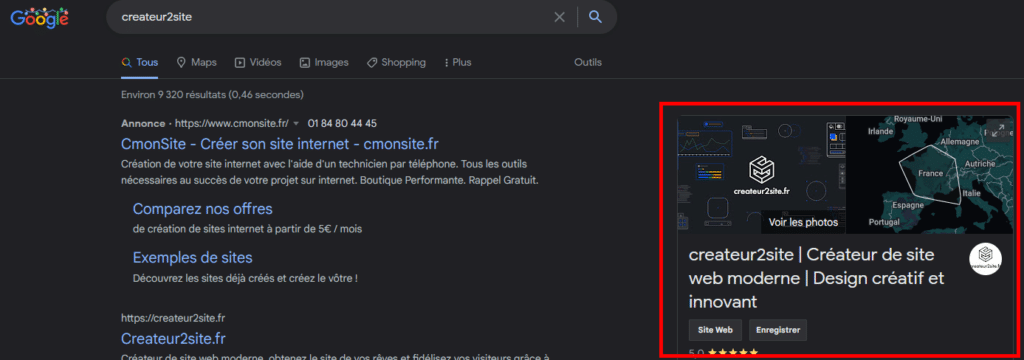
Google My Business with Brand Search
It often appears when you search for a business by its brand name, commonly called “Google Business Profile” or GBP in English.
Google My Business Local Packs
Local packs are one of the main display formats that Google uses to rank and present local business information. Local packs are displayed whenever Google thinks a search term has local intent (for example, “best restaurant”). The internet user does not need to include geographic terms in their phrase for Google to assume the intent is local. If in doubt, it will also display results outside your geographic area while still offering businesses near you.
Nowadays, a local pack is most often made up of three business listings, with the option of clicking on a map or an “View all” button to see the other businesses.
Local pack results look like this in desktop search, generally positioned above the organic search results:

The organic search results just below also very often correspond to your geolocation, even if these results appear “classic”. In fact, there are very few commercial expressions for which Google will not take your geolocation into account to offer you the most relevant results — with or without a carousel and with or without geolocation activated.
Google My Business and Google Maps
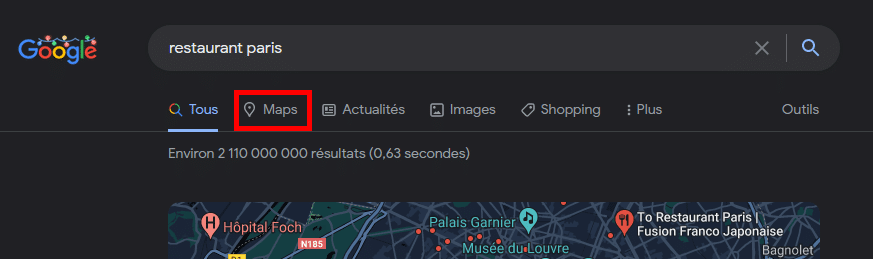
Google Maps is the default display on smartphones. Desktop users can also choose to search via the Google Maps interface rather than via Google’s default search. Simply either search directly on Google Maps, or click on the “maps” link in the options at the top of the search results, like this:
Which will then give:
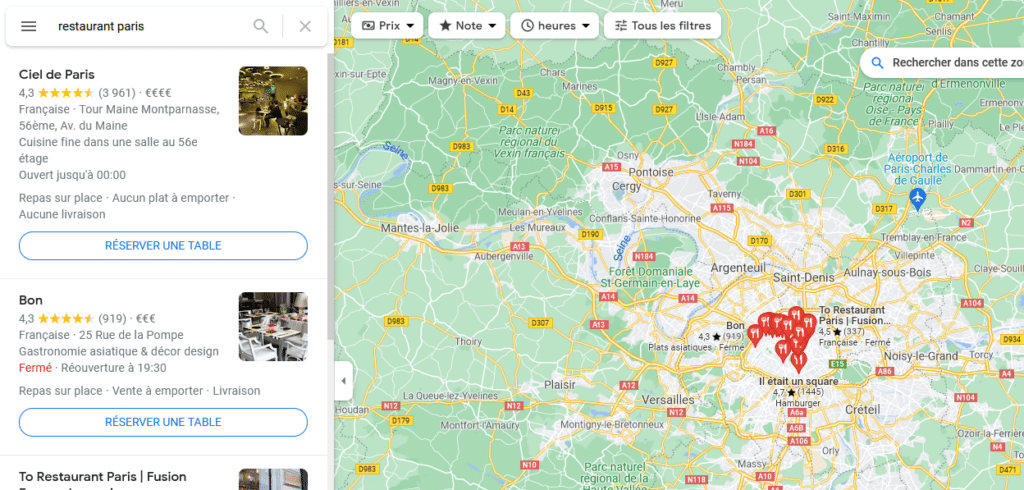
So that is what creating a GMB listing for your business is useful for. In reality, whether your business is local or not, it is always good to have as many opportunities as possible to be displayed on Google. By the way, if you are a sole trader and therefore work directly from home, it is possible to hide your address in the settings. In any case, if you are not eligible for a GMB listing, Google will not allow you to create one.
Creating and Managing Your Google My Business Listing
In order to create your Google My Business listing and conquer local search, simply go , log in with the email address of your choice and simply complete the form (very quick and simple).
Once created, all that remains is to prove that the location belongs to you — generally by receiving a letter at the address you provided with a validation code.
While it is still possible to modify your business on the classic admin panel, it is due to disappear. Indeed, it is now possible to manage everything from the search results when you search for your brand name. If you are logged into the Google account linked to the account that created the business listing, your admin panel will automatically be displayed in the SERP:

When you click on edit profile, you will have access to all possible modifications — still within the search results:
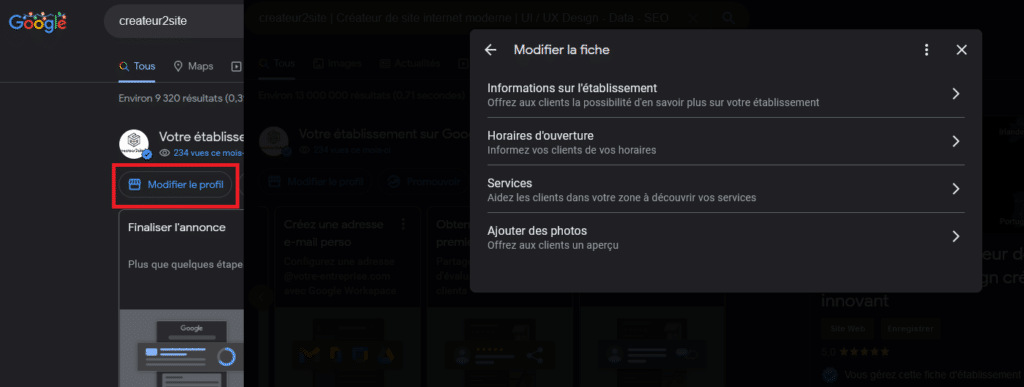
I invite you to fill in as many parameters as possible!
10 Steps to Optimise Your Google My Business Listing
After creating your listing — even if you wait years — it is likely that you will not be displayed, or at least not in the top results, and you will therefore remain invisible to internet users.
And that is normal! There are many other businesses and competition is fierce. So to optimise local or global search, and here in particular the Google My Business listing, start by addressing these 10 criteria to ensure that creating your listing has a real impact.
1. Define Your Business: Categories
Categories describe what your business is, not what it does or sells. Always choose a primary category that best describes your business as a whole — not its products or services. Then you can always specify what you offer by completing the secondary categories.
This is one of the most important criteria. If you search “lawyer”, the “local packs” will show businesses that are categorised as “lawyer” — simply adding an additional word switches to other, more specialised primary categories:

Notice how adding the word “divorce” changes the results based on the primary category they have selected:
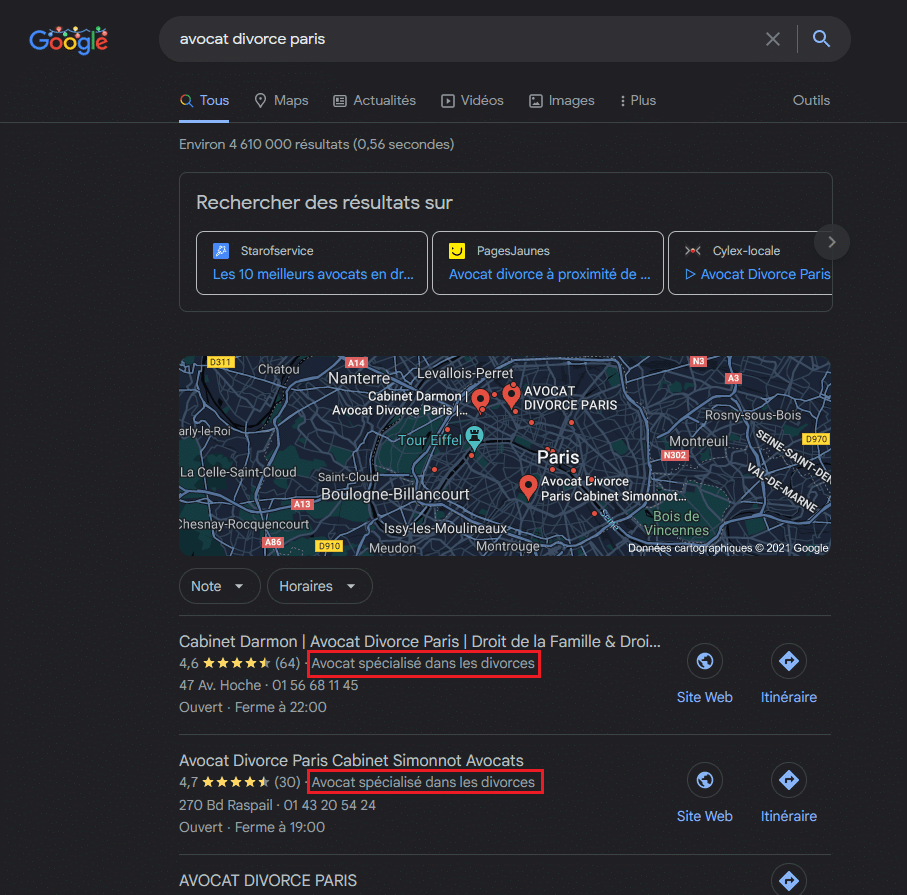
Moreover, if your business is specialised, you will naturally have less competition. Therefore, if you are a law firm specialising in divorce, do not use the “lawyer” category — it would make no sense.
2. Add Photos
Do not add two photos and a third one two years later if you want to optimise your listing! For example, if you are a restaurant, add photos of your Christmas dishes during the festive season. There is always something new and relevant to show.
According to Google, businesses with photos receive 42% more enquiries and 35% more clicks on their website than businesses without photos.
Anyone can add photos to a Google Business listing, including your customers. But by adding photos yourself, you ensure that your listing is seen in its best light and can stand out in search results.
Here is a non-exhaustive list of photos to add to your GMB:
- Add your logo
- Add a cover photo: choose something that showcases the personality of your business.
- Add more than 3 exterior photos. Take them from multiple angles throughout the day to help customers locate your business at any time.
- Add more than 3 interior photos. Capture the decor and atmosphere of your premises to attract customers.
- Add more than 3 product photos. Present your most popular items, services and other offerings in order to attract customers.
- Add more than 3 “at work” photos. Show your team providing services to customers.
- Add more than 3 team photos. Humanise your business by showcasing the personalities of your team members and staff.
When it comes to photos, the more the better. A BrightLocal study revealed that businesses with more than 100 photos receive 520% more calls, 2,717% more direction requests and 1,065% more website clicks than an “average” business — that is, one with fewer than ten photos.
Of course, do not add a hundred photos from the start — build up progressively.
Start with the points I gave just above and add more as you go.
Tip: Just as with SEO image optimisation on your site, it is strongly inadvisable to upload images with a default name such as IMG_6984111.png. Instead, describe the content of the image in its name, without accents or capital letters, like this: christmas-gastronomic-dish.png.
3. Add Products and Services
If Google offers you the possibility of adding products and/or services to your listing, it is worth doing if done well, as it can help your business listing appear for even more relevant searches.
For example, this leather clothing business:
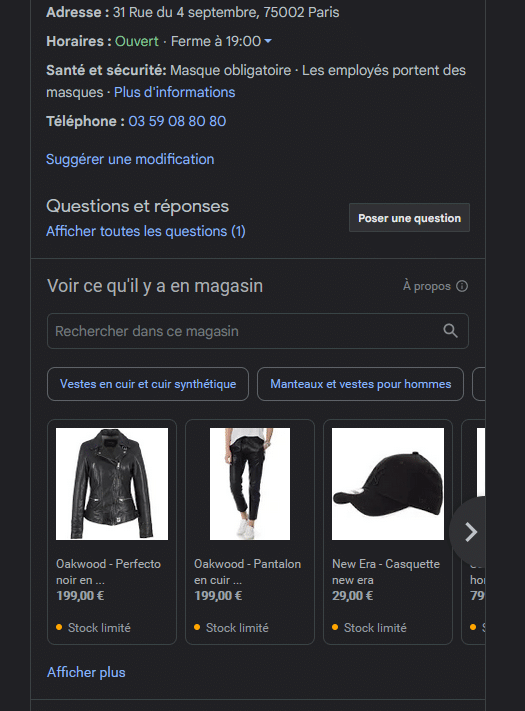
Add all relevant details to your products and services, such as the name, price, category, description, a link to the associated product or service page on your website, and do not forget the product image!
4. Get Reviews
Reviews are one of the most important criteria for ranking among the first results. Do not be shy — ask your customers for reviews; they will probably do it. On the other hand, if you do not ask them, there is little chance they will rate you, unless they are extremely satisfied or have not liked it at all.
The number of reviews is always more relevant than the rating, provided the rating is around average. For example, a restaurant with 3.8 stars out of 5 for 700 reviews will rank above a restaurant offering the same type of dishes with 5/5 stars from a small twenty or so voters. Obviously, the ideal is to have many reviews and very high ratings, although 3.8 is not particularly bad.
Here is a list to help you obtain new reviews:
- Ask your customers. If you interact with customers and you think they have had a positive experience, ask them to leave a review.
- Create and share a review link. Many customers do not know how to leave Google reviews. Google knows this, which is why they offer all businesses the ability to create a shareable review link. Find it, for example, in: Google My Business > Home > Get more reviews.
- Create “leave a review” cards. Have physical cards printed that thank customers for their business and invite them to leave a review. Include your abbreviated review link or a QR code to make it easy.
- Include your review link in your email signature. If you communicate with customers by email, this is an excellent passive way to gain more reviews.
- Integrate a review link in your emails — whether follow-up emails, newsletters and so on — as long as it is done well.
Tip: create an account on Trustpilot to get more reviews, but also on platforms that are not solely focused on reviews, such as TripAdvisor if relevant. There are many out there depending on your field. The more reviews there are, the more Google will like you.
Once a customer has given you a review — whether negative or not — respond to it, and as quickly as possible. They may also ask a question — obviously respond to it.
5. Enable and Respond to Questions
Enable Q&A notifications. Receive alerts every time someone asks a question about your business, then respond immediately.
Provide answers to FAQs from the start. Most websites have an FAQ page with answers to common questions. Do not wait — go ahead and ask and answer these questions yourself on your Google listing. Simply make sure you are logged into the same Google account as the one you use for Google My Business so that answers are marked as coming from the business owner.
6. Optimise Your Website’s SEO
If you are here, it is because you want to improve your local search engine ranking, and particularly at this point by using Google Business Profile. But to improve the display opportunities that Google uses with your GMB listing (GBP), it is also important to improve the authority of your site (off-site SEO) and to optimise the site itself (on-site SEO).
The most important criteria for local SEO and for your GMB listing to be pushed forward are:
- NAP citations
- Backlinks
- On-page
- Social networks
- CTR
Feel free to consult our article to improve your local SEO!
7. Google My Business Blog
Posts via your GMB listing allow you to share everything related to your business, and in particular news such as promotional offers, events and more. They will generally appear in a carousel at the bottom of your Google My Business panel.
Here are some tips for your posts:
- Use good photos.
- Write a catchy title. Do not just say “Sale on our coats” when you could say “Up to -80% on our coats during Black Friday!” or even better.
- Be specific but not overly so. You know, perhaps unconsciously, that when you click on a recent article on your smartphone for example, you click first on catchy titles. Generally these titles are specific, not too clickbait, but a little bit all the same.
- Prepare and publish your posts in advance. Do not wait until Valentine’s Day to publish an article about your roses as a Valentine’s gift.
- Do not post just to post. Guides will tell you that posts “send positive signals to Google” and that you should “publish as often as possible”. Of course that is important, but do not post with nothing to say — find the right balance.
8. Update Your Information
While this overlaps with Google posts, regularly updating your listing is not only about that. It is important to update your opening hours (are you closed on certain days due to public holidays, for example), publish new photos, and generally everything contained in this article. Regularity is always a good thing, provided it is done correctly.
9. Fill in as Much as Possible
I do not want to list everything since the rest does not necessarily require further explanation — simply be logical and fill in as much as GMB offers you.
That is to say:
- Choose your business type (storefront, service area such as a restaurant, or finally the hybrid option)
- Add opening hours
- Set holiday hours
- Add your contact details
- Enable messages
- And… Fill in everything else
10. Call on an SEO Consultant
Calling on an SEO consultant to improve your Google My Business listing and more broadly your local SEO is undoubtedly a decisive step towards ranking above your competitors. An SEO expert will be able to provide you with a wealth of advice and you will benefit from their experience.
When you learn a subject, you will not manage to do the complex exercises without practising again and again — you will inevitably have to work through the simpler exercises while pulling your hair out. Meanwhile, years pass during which you could already have been ranking. Not to mention that your time is money. It is also likely that you will never manage to rank at all.
If you would like to call on an SEO expert, do not hesitate to contact me. And if you have questions, send us a message on social media or comment on this article — do not hesitate!