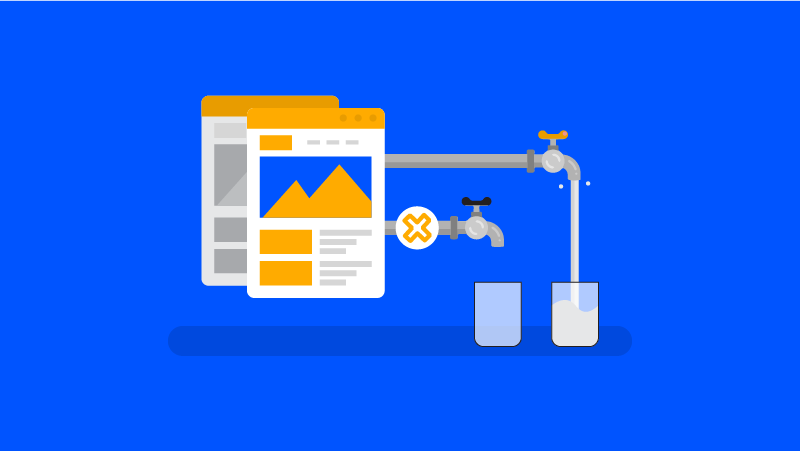
Link obfuscation — also called link offuscation or cloaking — allows you to hide one or more links on a web page from Google. Why? Because to this day, internal linking plays a crucial role in a website’s SEO. Hiding a link allows you to optimise the distribution of PageRank within your internal linking structure.
Why Use Link Obfuscation?
PageRank is like a fluid that is transmitted from page to page, spreading the site’s authority. Since a diagram is always clearer than a block of text, here is how authority juice is distributed in simplified form:

A page X (not necessarily the home page) links to 4 other pages — in that case we have 100/4 = 25. The point here is that we want to sculpt our site’s PageRank; we do not want to distribute juice to the legal notices page, but rather towards our product pages which are meant to rank on Google. This is precisely why we use link obfuscation.
Another use of “cloaking” beyond PageRank sculpting is to maintain the watertightness of an optimised internal linking structure — such as for a semantic silo — while maintaining a good user experience. For example, if you need to create a link to a page for the user such as a link to another silo, you can use link obfuscation.
Continuing with its UX-related interest, we can also note that it would be wise to transform external links — such as citing Wikipedia for the user — while using obfuscation to prioritise PR for your own pages.
There are many other reasons to obfuscate, such as for e-commerce sites — for example the cart page, which there is no point in indexing.
Or even more impactful: the obfuscation of faceted navigation to control PR distribution:
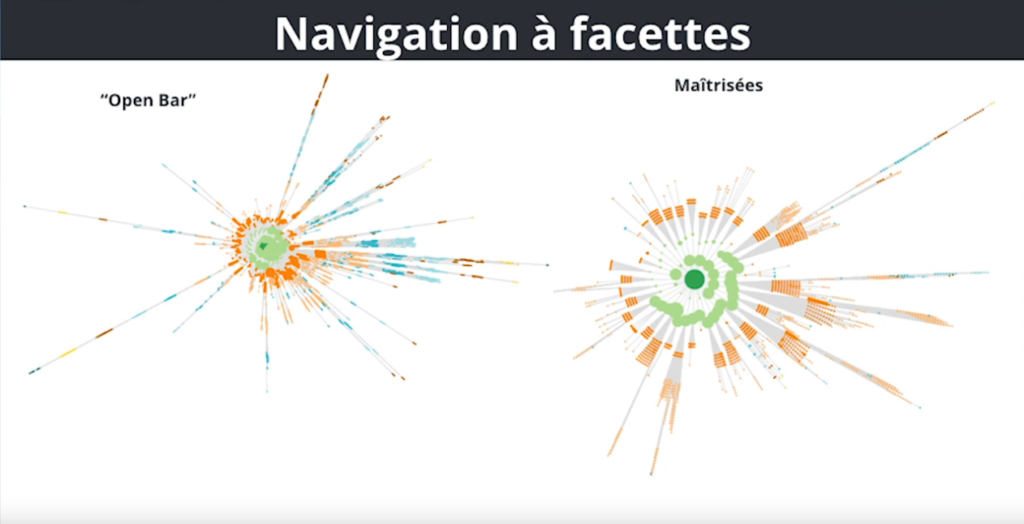
Note: obfuscation can bring other benefits beyond PageRank optimisation, such as optimising crawl budget.
The Reasonable Surfer
In reality, the previous PageRank diagram is a gross simplification. Due to the Reasonable Surfer model, PR does not distribute proportionally. Indeed, depending on the position of your links, Google gives a different coefficient. That is, a full-content link might carry 50% of the PageRank, of which 5% might be redistributed to 10 footer links (so 0.5% per link).

However, do not be mistaken — even if only 5% of the total PR is distributed across your menu and footer among some twenty links, it is still a waste.
Imagine: a menu and footer are present on every page. That means across more than 100 pages, the impact of PageRank distributing at 5% x100 is no longer so trivial. In short, obfuscation matters — especially if you have many pages.
How Does Obfuscation Work
Google calculates PageRank distribution when it detects an <a> link — however, events like <button onclick=""> are not considered by Google, at least not for PR distribution.
If an href link has an attribute other than Dofollow, this means that PR will not be distributed to the target page but spread among all indexed sites on the web.
No to Nofollow!
Perhaps you think it is enough to use the rel nofollow attribute to optimise PageRank? Absolutely not. Nofollow is what is called a “PageRank sink” — a black hole.
Let me explain: for technical reasons, the PR of a nofollow link is redistributed to the entire web and not to the page in question. Put another way, the juice is still divided by the link, but the page does not benefit from it. Do you understand the black hole concept?

The same applies with the “sponsored” attribute and others. If the link is not for your internal linking and you do not want to attribute credit to the link, you must use obfuscation to avoid wasting your site’s juice.
White Hat or Black Hat?
Several SEO professionals have posed the question to people at Google. Currently, in 2024, no risk of any penalty is envisaged for this practice. The response stems from the fact that user experience is preserved and this form of cloaking hides nothing from the user and is not there to deceive them.
The Code for Obfuscation
Opinions differ on how to obfuscate links. For some, a simple <button> is not enough — Google might still detect the link. Even though I personally find this analysis to have no technical basis, I will also teach you how to be certain of hiding the link from Google.
Link Obfuscation: the Simple, Fast and Effective Method:
<button onclick="window.location.href = 'https://twitter.com/createur2site';"></button>
A simple link in a button. Nothing more, nothing less. Easy to implement, fast and it works.
Link Obfuscation in JavaScript (Base 64):
If you want to be certain of hiding your links from Google, here is another obfuscation method — one could call it cloaked link obfuscation:
1. The HTML Code for Obfuscation:
<span class="urlencode" data-urlencode="aHR0cHM6Ly93d3cuNDEwLWdvbmUuZnIvYS1wcm9wb3MuaHRtbA==">
legal notices
</span>
Click here to encode your URL in Base 64
2. The JavaScript Code for Obfuscation:
<script>
document.addEventListener("DOMContentLoaded", function(event) {
var classname = document.getElementsByClassName("urlencode");
for (var i = 0; i < classname.length; i++) {
classname[i].addEventListener('click', myFunction, false);
classname[i].addEventListener('contextmenu', myRightFunction, false);
}
});
var myFunction = function(event) {
var attribute = this.getAttribute("data-urlencode");
if(event.ctrlKey) {
var newWindow = window.open(decodeURIComponent(window.atob(attribute)), '_blank');
newWindow.focus();
} else {
document.location.href= decodeURIComponent(window.atob(attribute));
}
};
var myRightFunction = function(event) {
var attribute = this.getAttribute("data-urlencode");
if(event.ctrlKey) {
var newWindow = window.open(decodeURIComponent(window.atob(attribute)), '_blank');
newWindow.focus();
} else {
window.open(decodeURIComponent(window.atob(attribute)),'_blank');
}
}
</script>
3. The Final Touch in CSS to Simulate a “Real” Link:
.urlencode:hover {
cursor : pointer;
// Here put the CSS of your links to simulate your classic links
}
PS: giving credit where it is due. The Base 64 code was taken from 410 Gone.
Link Obfuscation in ROT 13:
If you are even more paranoid, it is possible to encode your URLs differently from Base64, given how widespread it is. This technique would probably be more logical.
Example: <span class="link_obf" data_obf="<?= str_rot13('mylink.html') ?>">obfuscated link</span>
The GitHub: https://github.com/drogbadvc/link-obfuscation
Link Obfuscation on WordPress:
If you use WordPress, it will be more complicated. You can still add a code module on each of your pages with the <script> tag.
Then insert the JS or your HTML button — but for example, for WordPress’s native menu, modifying the HTML will be more complex.
That is why I recommend link obfuscation plugins:
- Obfuscate → €59
- WP_Rank → €79
- Ghostlink → €99
Advanced Obfuscation
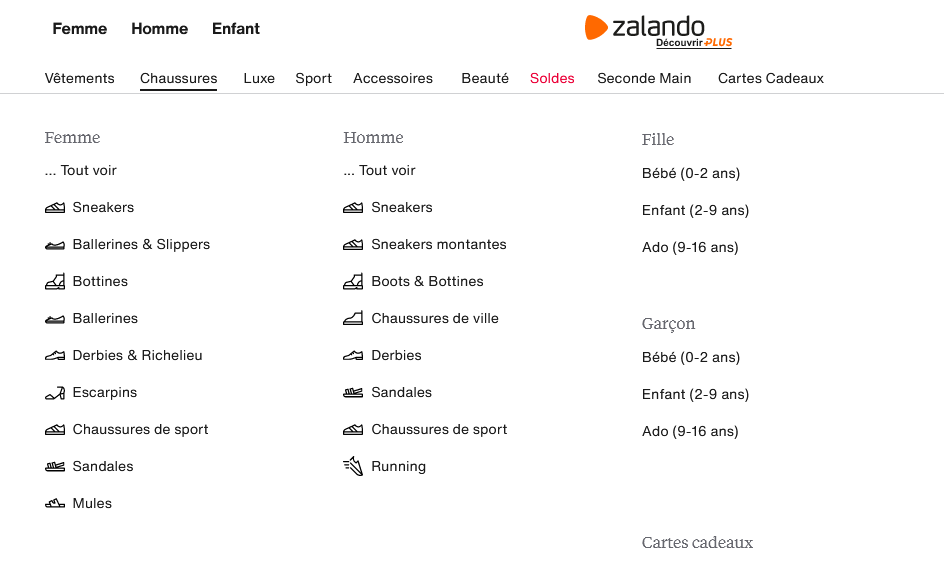
Let us talk about something that frustrates all SEO professionals: mega menus.
Why? Because in any case where you are on a page, because of the mega menu, silos are linked to each other, as well as their categories and sub-categories. In other words, this is not at all optimised for Google bot.
Here is what a mega menu looks like if you did not know:
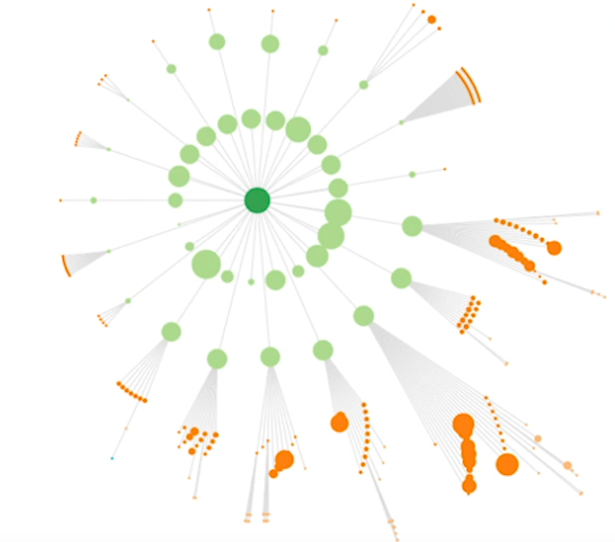
To solve this problem, it is possible to implement active-mode obfuscation. Visually, the PageRank distribution of a mega menu looks like this, even if it is correctly siloed inside the pages:
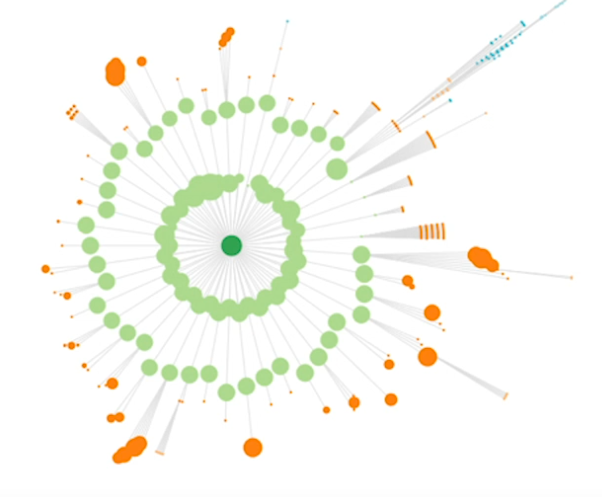
Put differently, mega menus destroy your entire structure. Whereas by obfuscating mega menu links, it looks like this:
Dynamic Obfuscation
To limit the PageRank distribution of mega menus (among other things), it is necessary to implement dynamic obfuscation. Therefore, you must not put clear <button> tags because depending on the position of your user, the link obfuscation will need to change. Otherwise, another simpler method is to generate a different new HTML menu code for each page.
For example:
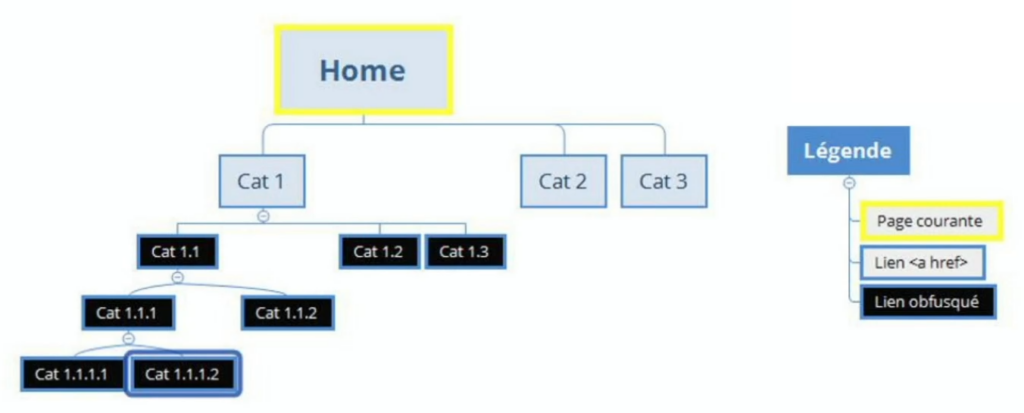
In yellow, that is where we are. On a light background are the links (<a href>) and in black are the obfuscated links. At this point, only the first categories are visible to the bot.
Once we progress deeper, we must continue linking the ancestors that allowed us to get here while always following the same principle:

Finally, at level 3, we omit the other sub-categories of the main category as they are no longer relevant at this level of precision:
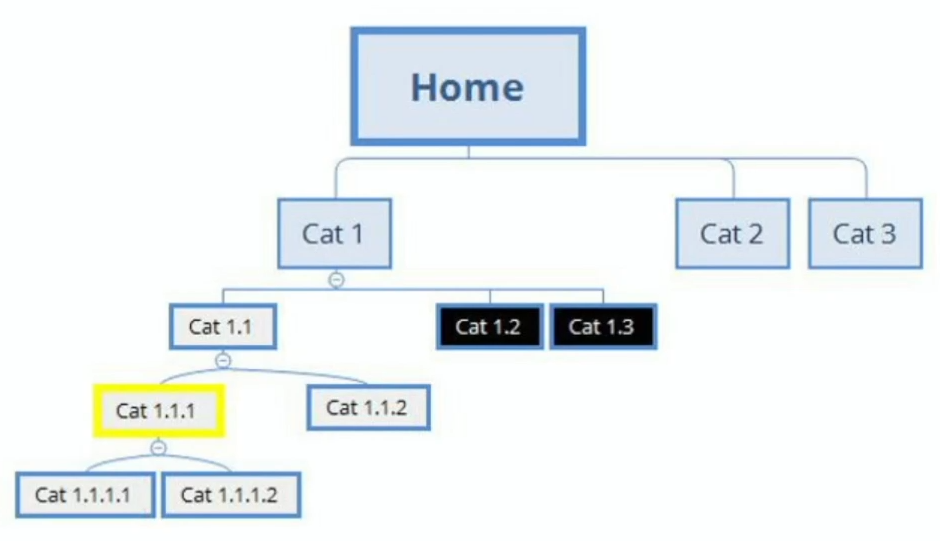
This representation was taken from a SEO Camp conference by Frédérik Bobet.