
On-page optimisation — also called on-site SEO optimisation — is one of the 3 major families of improvement for natural search engine ranking. On-page optimisation is probably one of the simplest because you have complete control over it. As its name suggests, it involves optimising your pages from the inside. We will see throughout this article the various techniques available.
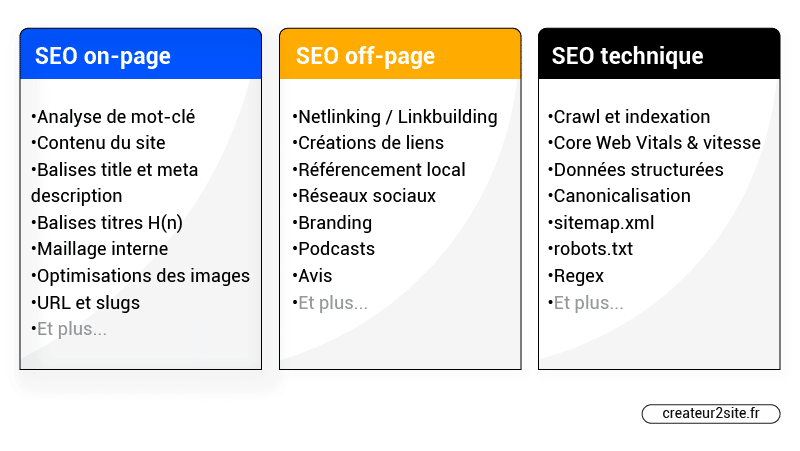
Search engine ranking can be divided into three categories: on-site (or on-page) SEO, off-page (or off-site) SEO, and technical SEO — sometimes grouped together with on-page SEO.
What Is On-Page Search Engine Ranking?
On-page or on-site search engine ranking refers to all efforts deployed “inside the website” to improve its ranking in search engines.
We can list a wide range of possible on-page optimisation techniques such as:
- Improving internal linking (silo / semantic cluster…)
- SEO-optimised writing / Content optimisation
- Perfecting search intent
- Optimising images for search engine ranking (Alt tag, title, description…)
- Meta description
- Optimising H1, H2… title tags
- …
On-Page SEO vs Off-Page SEO vs Technical SEO
On-site SEO is something over which you have complete control — which is not always the case for off-site search engine ranking.
Whatever the off-page SEO optimisations (or almost all of them), you cannot predict whether they will work since you do not have complete control over them (without cheating, at least).
Conversely, if you improve the speed of your site (technical SEO), add co-occurrences (on-page SEO) and the like, this is on-page SEO because you can make that change directly on your website.
If you are ever unsure which category a search engine ranking tactic falls into, ask yourself whether it is entirely within your control. If the answer is no, it is probably an off-page SEO tactic.
Technical SEO is often integrated into on-site SEO. In this category you can find all the technical aspects of on-page SEO. For example, optimising search intent would be more in the non-technical aspect, whereas integrating structured data tags (schema markup) or optimising the crawlability of pages would be in the technical aspect.
What Is the Impact of On-Page SEO?
Like all the major families of SEO optimisation, if you neglect one area it is likely to be impossible for you to position yourself on a minimally competitive query. For example, if you want to position yourself on “shoes”, while you only offer men’s shoes on your page, you will not be able to rank on the first page (the principle of search intent) regardless of any improvements made to your site.
On-page SEO is much more than placing keywords or occurrences / co-occurrences in your content. What is most important in the first place is above all the user experience your page provides in relation to what the internet user expects. That is to say, good content, an article that will help them, and supplementary content that can genuinely complement their reading. Good content is normally already keyword-optimised. The first time I wrote the article “complete guide to optimising your SEO”, keyword optimisation tools told me I was above the +100% optimisation threshold — the article was entirely created naturally. If you are a beginner, you should primarily learn the concept of search intent rather than worrying about keyword optimisation within content.
The 5 Basic Principles of On-Page SEO
To start, let us look at the most classic, simplest and quickest optimisations. The advanced sections will come at the end.
1. The H1 Title Tag
Hn title tags are one of the most classic on-site optimisations. The H1 title tag is one of the most important for your search engine ranking. I therefore invite you to check on each of your pages that you have an H1 title tag. Then optimise it. It is vital to include the main keyword you are targeting in the H1 title tag. It is also important that your titles appear natural, so use conjunctions and stop words if necessary. Furthermore, do not simply add your keyword.
H2 H3 H4… Title Tags
It is important to have a good title tag architecture:
This consists of always correctly hierarchising your title tags. You must not start with an H3 title tag — always start with an H1 then an H2, H3, etc.
If you have doubts, you can — you will also be able to verify that all other elements concerning title tags are properly respected.
2. Write a Good Title and Meta Description
The title tag — sometimes incorrectly called a meta title — and the meta description do not directly influence the ranking of your page.

In reality, CTR could improve your position in the SERPs (the learning to rank algorithm).
However, they allow you to generate more traffic and clicks if they make the internet user want to click.
Here are a few tips:
- Match the search intent
- Use active voice. Address the searcher directly.
- Be concise. Make it enticing.
- Include your keyword. Google bolds the keyword (as in the example just above).
Do not spend too much time writing meta descriptions because they are relatively unimportant in the grand scheme of things. And do not bother sprinkling keywords and occurrences hoping to rank better — it is pointless.
3. Optimise Your Images
For your search engine ranking, it is important to always include images in your pages / posts. But that is not all — it is also important to know how to optimise your images from an SEO perspective.
a) Give Images Descriptive Names
To begin with, Google looks for clues about your images starting from the file name — so if you serve images named IMG_562023.jpg, Google will not be able to understand the purpose of your image; at the very least you are not making its job easier. For this reason, when you upload an image to your site, give it a descriptive name, without adding all possible keywords.
Example:
Be descriptive: black-puppy.jpg > puppy.jpg
Be concise: black-puppy.jpg > my-super-cute-black-puppy-josh.jpg
Do not stuff with keywords: black-puppy.jpg > black-puppy-dog-canine.jpg
Use hyphens between words: black-puppy.jpg > black_puppy.jpg
Do not include accents: black-cat-bicycle.jpg > black-cat-bicyclé.jpg
b) Use Alternative Text (ALT Tag)
Alternative text — also called the “ALT” attribute — is read by search engines; you can use it to add your keywords.
<img src=”https://domain.com/black-cat.jpg” alt=”Black cat riding a bicycle”>
Again, Google uses this data to contextualise the image in relation to your content, and also uses this tag to rank you in Google Images. Once again, do not stuff your images with keywords.
Note that keywords placed in the ALT tag will replace the image if the browser cannot display it; moreover, if the image serves no informational purpose (such as a background), you must not display an Alt attribute to avoid appearing spammy.
- Be descriptive. Use relevant keywords where appropriate.
- Be concise. Keep things short to avoid annoying users with screen readers.
- Be precise. Describe what is actually in the image.
- Avoid stating that it is an image. Do not include “Image of…” or “Photo of…” in descriptions.
c) Add a Title, Caption and Description
The context and content of the page where the image is located, combined with a logical title, caption and description, provide search engines with more information that can improve your natural search engine ranking.
<img src=”/media/elephant.jpg”
alt=”An elephant at sunset”>
<figcaption>An elephant at sunset</figcaption>
If you use WordPress, go to Media and choose the image you want to optimise. You can easily add an alt tag, description and caption to your images.
4. Use Short and Descriptive URLs (Slugs)
SEO URL optimisation is one of the most basic on-page search engine ranking techniques.
Example: https://createur2site.fr/en/seo/on-page-seo-optimisations-guide/
- Lowercase only and without accents.
- Use the “-” character as a separator.
- Be as short as possible (avoid using unnecessary characters or words).
- Reuse your keywords in the URL (this naturally reflects your content).
- Avoid numbers — less understandable for Google than text.
- Avoid dates. Google will more easily guess that your content is old and therefore possibly outdated.
Even if it does not really affect search engine ranking, avoid URLs such as: https://domain.com/articles/322345 at all costs.
Choosing your URL should take no more than a minute.
5. Internal Linking: Add Links
Internal linking refers to all the links on a site that connect pages to each other. Clean and coherent internal linking is a major plus for your on-site search engine ranking. The idea is to offer complementary links between your pages and articles within the content — not in the menu or footer. For example, if you have a product page about coffee beans, nothing prevents you from offering your internet users within the content of that page, the product page for coffee machines. However, make sure you do not exceed 8 links in your content.
The principle of the reasonable surfer — a patent filed by Google — indicates that an internet user is more likely to click on a link present in the content of a page than in a menu or footer; your in-content link therefore carries much more weight.
The 3 Pillars of On-Page SEO
Now that you have familiarised yourself with the classic on-page SEO checklist, let us discover the 3 indispensable pillars of on-page SEO, which are:
- Keyword research
- The basics of search intent
- SEO writing
1. SEO Keyword Research
Keyword research is a crucial step. You must do it to avoid creating content about things nobody searches for. You must also ask yourself for each keyword:
- Are people who search for this keyword likely to become my customers?
- Can I offer internet users something better than what already exists?
- Is the keyword (too) competitive?
- Is the search volume relevant?
- Is the search volume consistent?
- Does the search intent of the keyword match my needs?
The 5 Best Tools for Choosing Your SEO Keyword
There are many different ways to choose a keyword — free, freemium and paid. Here are what I consider the best:
- SemRush
- Ahrefs
- Moz
- Ubersuggest (free)
- Yooda Insight
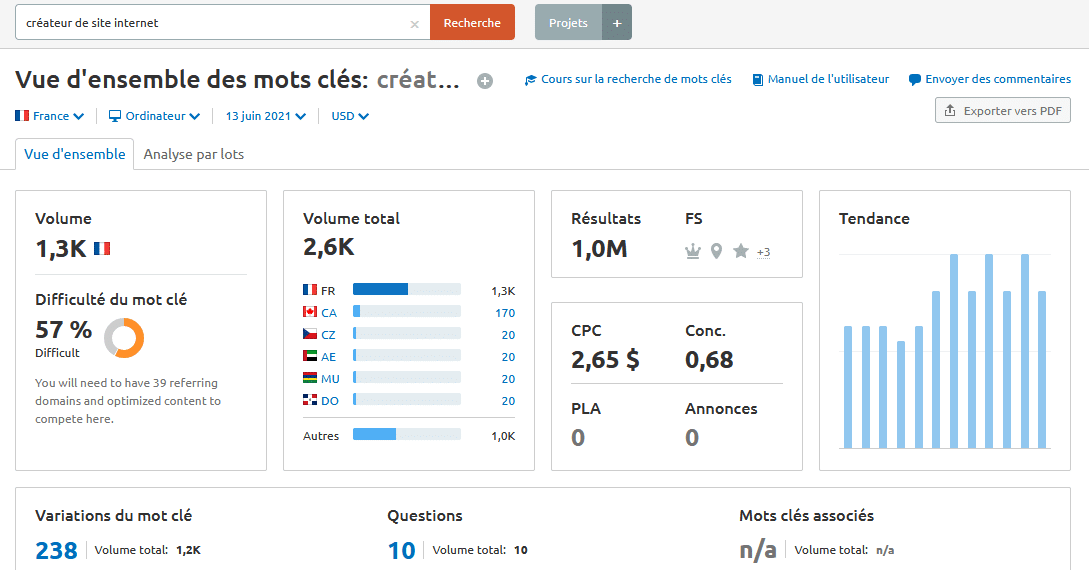
Using these tools, you will be able to easily check SEO competition, traffic volume for the query, and much more. Here is an example for SemRush:
2. The Basics of Search Intent
We hear a lot about search intent, but what is it? Search intent is something easily understandable. It is simply what the internet user wants to find when performing a search. If the concept is simple to understand, in practice it is much more complicated to optimise search intent.
For example, if an internet user searches for Jaguar, do they want to find the feline or the car brand? If this example is admittedly tricky, sometimes a simple query can prove totally disappointing for searchers. For example, if you want to offer men’s shoes targeting the keyword “shoes”, it will be impossible for you to position yourself if you do not check the search intent. Indeed, since the majority of searchers for this query are women, Google considers you off-topic — and rightly so.
When you do SEO keyword research and when you write your landing pages or articles, you must not write or display whatever you want — otherwise your chances of ranking are almost zero. Or to put it simply: you are just not doing SEO.
3. SEO Writing
You will find a lot on the web saying that SEO writing is simply writing sprinkled with keywords. This is completely false.
To begin with, think about writing well for your internet user based on search intent. If they are looking for a price, do not give them a 5,000-word article — a simple simulator with at most a hundred words will rank much better.
Ultimately, this search intent step is the most important for ranking your pages. You can still add occurrences, co-occurrences or meta keywords with lexemes to optimise your articles, but this is quite sensitive territory for beginners. One could also mention adding PAAs and many other things, but I have written a complete article on this which I recommend you go and read directly.
5 On-Page SEO Tips
To conclude, here is a list of some of my favourite on-site search engine ranking techniques.
Once you have optimised your page title and H1 H2 tags, here are a few tips that will help you take your on-page SEO to the next level:
- Add elements other than classic text, such as HTML tables or images, videos, PDFs… If you are targeting the keyword “insurance price”, offer an interactive simulator — avoid walls of text if you can and if it makes sense.
- Add internal links to your pages that coincide with the page itself. Good internal linking that allows the internet user to complement their reading is ideal for better positioning.
- Add FAQs / PAAs in your content
- Make your content good enough to be shared. Use original images (created by you) that can be reused in other articles — this is an excellent way to obtain a tonne of backlinks.
- Write blog articles