
<H1> to <H6> tags allow you to architect a site for search engines. Unfortunately, CMS platforms generally use them to increase text size, and this often produces real monsters with menus and footers made up of H2s and other oddities not at all optimised for SEO.
What Are H(n) Tags?
H(n) tags allow you to create a hierarchy in content. The H stands for Headings. They are HTML heading elements used for titling.
Put differently, they are HTML title elements for highlighting page titles — and especially for Google. They are useful for search engine crawl bots to better understand your content, since a CSS with a larger font would suffice for us humans.
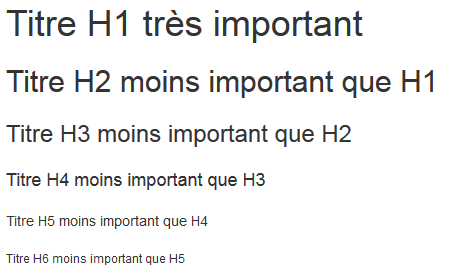
Better than a block of text, here is what a good heading tag architecture looks like:

Heading tags also provide a better user experience, as they force you to structure your document better and be more descriptive.
Moreover, millions of visually impaired people use screen readers to convert web pages to audio — heading tags help improve accessibility.
Why Are H(n) Tags Important for SEO?
As seen previously, heading tags allow Google and other search engines to analyse what a page is about, segmented into sections. Google does not see a page the way you see it — these tags allow it to know how you built your page and therefore understand the context of each section.
On the SEO optimisation side, adding the keywords you are targeting and synonyms in secondary heading tags will help you rank better in search results.
Indeed, the H1 tag is the most important, the H2 slightly less so, and so on.
Do not expect to appear on Google’s first page from one day to the next by implementing this optimisation. Everyone does it, and it is something you will do automatically after a while. It is the basics of SEO writing.
The H1 Tag, the Most Important for SEO
The most important tag in SEO is the H1 tag, by far. The difference in weight between an H2 and an H3 is not great.
The H1 tag must absolutely include the main keyword you are targeting. Whatever the heading tag architecture, word count or anything else — this is the tag you really need to work on.
Here are some basic rules to follow for the H1 tag:
- One unique H1 tag per page
- The H1 tag must describe the content
- The H1 tag contains the page’s main keyword
- The H1 tag does not exceed 5 words
- Always have an H1 tag on your page, and only one
5 Rules to Follow for Your Hn Tags
There are conventional rules to follow to build your page titles correctly. If they exist, it is for good reason.
1. Never Skip a Heading Tag
A page starts with an H1 tag, not an H2 or H3 tag.
Also, an H2 tag is never followed by an H4 — otherwise you have skipped one. Logically, you build your site in a logical way, so it would make no sense to skip one. Naturally, if you have placed one heading followed by another, there is no reason to skip one.
The idea is always to maintain a good structure rather than using only H2 tags because they might potentially carry more weight than an H3.
2. One and Only One H1 Tag Per Page
You must always have an H1 tag for each of your pages. You must also have one and only one per page.
For general knowledge, in reality having multiple H1 tags has “no impact” — it is a shortcut made by SEO professionals. Simply because Google has put in place mechanisms that allow it to understand which tag describes all the content — that is, the main H1. The other H1s are interpreted as H2s.
In fact, in HTML5, a <section> nested within another section that has an H1 while another H1 is placed in a preceding <section> will be considered as H2.

Why should you still not use multiple H1 tags? Simply because you expose yourself to SEO problems if the semantic code of your CMS, theme or page builder is poorly built. And search engines might misinterpret the “main” H1 tag.
In any case, it costs you nothing to be certain of doing things correctly.
3. The Length of the H1, and H2 – H6 Tags
In principle, an H1 tag should not exceed 70 characters (on average — in reality we are talking about pixels).
In fact, this is mainly because if your H1 tag is used as the title of your pages, it will be truncated in search results — meaning part of the H1 will not be visible on screen.
Also, in terms of SEO optimisation, it is generally better not to exceed 5 words.
As for the other heading tags, the convention is not to exceed 80 characters. The shorter it is while being sufficiently descriptive, the better.
4. Use Your Keywords
The H1 tag must absolutely include the main keyword you are targeting — it is a necessity.
However, appear natural. If for some reason you cannot include the exact keyword, that is not too serious. Do not be afraid to add conjunctions or stop words (the, a, of…) to make the title sound more natural.
As for the other heading tags (H2 – H6), the ideal is to include keywords for which your main keyword could also rank. For example, suppose you are targeting “hreflang”. You place “hreflang” in your H1, and since people also search for “hreflang WordPress”, you can put “Setting up the hreflang tag on WordPress” as an H2.
Another good SEO optimisation is to add synonyms of your main keyword in the other heading tags. This helps improve semantics since heading tags have more impact than plain text.
5. Write H1 Tags That Make People Want to Read On
When a user arrives on your page, if your H1 tag is boring, they will not be very inclined to look at the rest of the content.
For example, Learning to Rank takes into account a page’s CTR and its bounce rate to rank pages. Take this with a pinch of salt if you have not read our article on it. But it is not just LR — algorithms such as RankBrain or BERT could have an influence if your H1 title is boring, since Google increasingly takes user experience into account.
In summary, it is a good practice both for your SEO and for user experience in general.
5 Common H(n) Tag Mistakes
Even though the rules and best practices have already been mentioned, it is important to highlight all the common mistakes made by novices. This will also allow you to answer questions you may have had.
1. Do Not Write the Same Content for the H1 Tag and the Title Tag
The H1 tag and the title tag (<title>), also called the meta title, are often confused — wrongly.
And often, website owners place the same text for both tags, which are nonetheless different. You must not do this.
A title tag must absolutely attract the click. The H1 tag must attract the click and the visitor’s attention, but also be SEO-optimised. And to put it more simply, the H1 tag and the title tag must complement each other.
Make your H1 consistent with your Title, but do not write identical text.
2. Using a CMS? Be Careful
While CMS platforms — and especially WordPress — are very good for optimising a site’s SEO, they can also be a big handicap. When website owners are not aware of SEO optimisation, they use heading tags to make text appear larger than their simple paragraph text (<p>), rather than modifying the style with CSS. And this obviously causes a whole series of problems.
Put differently, to change the visual formatting of a title, use CSS rather than using a heading level that does not correspond to the hierarchy. Heading tags are not there for formatting purposes.
Note: the majority of page builders still use headings for visual formatting, so be careful — it can quickly become a nightmare even if you are not the origin of the problem.
3. Avoid Spam
Avoid appearing spammy in Google’s eyes like a capitalist SEO professional — try to appear natural, while optimising your structure for search engines.
Also, avoid using the keyword(s) you are targeting multiple times in each heading.
That is, do not do this:
H1: The H1 tag for SEO
H2: How to create a good H1 tag?
H3: Do not exceed 5 words for your H1 tag
H3: Use your keyword in your H1 tag
H3: Make your readers want to read on with your H1 tag
You get the idea…
4. Do Not Place H(n) Tags in the Menu / Footer
Stop doing that. I do not understand why some SEO professionals “recommend” this. It is not logical and it seems so obvious. Your heading tags have no place in your menu, nor in your footer, nor to format your social media links.
They are there to structure the content of your page. And also to help Google understand the context of the page. So why put H4 heading tags on “legal notices”?
5. Do Not Be Afraid of Deep Tags
While H6 and H5 tags are almost never used, at least do not be afraid to use H3 and H4 tags.
If you go deeper into a subject from an H3, it is entirely normal and coherent to create an H4.
Note: do not write long text for a single heading tag — it is very bad for user experience.
Analyse Your Site
If you are not sure you have done things correctly, and you are not comfortable inspecting the source code, or you simply want to save time, you can use the webrankinfo tool which will analyse your heading tags in their entirety: https://www.webrankinfo.com/outils/balises-h1-h6.php
If you want to analyse all heading tags for all pages of your site, the best approach is to use a crawl tool such as ScreamingFrog, or to perform an audit using a tool such as SEMrush (free feature).