
Creating good URLs for SEO is not complicated — it is simply a matter of putting a few basic rules in place so that it becomes natural in your process.
But before moving on to the practical tips, here is what a URL looks like:
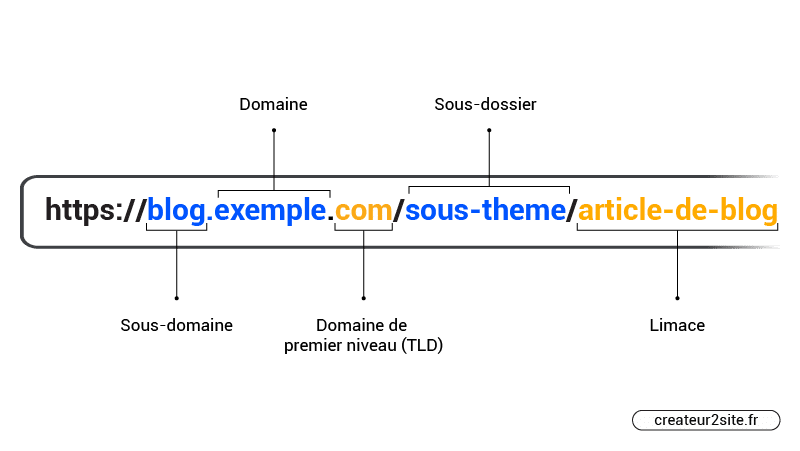
In SEO, we often talk about the sub-folder, called the Slug. This is what you modify each time you publish a new page.
Let us see how to optimise the Slug of your pages for SEO (and more).
Advanced technical tips for beginners are at the bottom of the page.
Is the Slug a Ranking Factor?
Sorry to disappoint you, but writing good URLs and in particular a good slug has no concrete impact on your SEO. In fact, it could help Google better understand the context of a page when it reads it, but in reality it does not matter much — it will explore the page content to understand what it is about.
That is to say, writing good URLs is more of a conventional rule, one that primarily considers good user experience.
Let us look at this in detail.
10 Tips for Writing Good URLs
If you have already created your URLs and want to modify them to “optimise your SEO” such as by adding one or more keywords, drop it immediately. You will do more harm than good.
On the other hand, if your pages are not yet created, here is how you should structure your Slugs:
1. Use the Target Keyword
Even if it has little to no SEO impact, it has more impact on user experience. Imagine you are targeting the keyword “shoes” — if your slug is “shoes”, it allows the user to feel they are in the right place.
On the other hand, if you are targeting a long tail like “optimise-seo-wordpress-yoast”, that is bad practice. You could simply use something like “seo-yoast” for example.
Google itself says:
“URL’s with words that are relevant to your site’s content and structure are friendlier for visitors navigating your site.”
Normally, adding a keyword should be natural.
2. URLs Must Be Readable
Many blogs classify their articles by year and publication date, or by the number of articles.
Sometimes this can produce things like:
https://site.com/25222973/
Neither the search engine nor the user understands where they are.
3. Write Short and Descriptive URLs
Your URLs must be short — this will prevent them from appearing spammy for no reason, and also prevent your URL from being truncated when your page is visible in search results.
Short URLs are good, but they must be descriptive. If you write “nike-shoes” in your slug when you only offer men’s Nike shoes, then write “men-nike-shoes” instead.
In general, you should not use words such as “I, the, when, how…” but sometimes that can be important.
The goal is not to make your URL so short that it no longer precisely describes its content. It is about removing unnecessary words and phrases. That is common sense.
4. Do Not Write Numbers and Even Less Dates
You must never write numbers in your slugs.
For example, a rather cool URL like this one: createur2site.fr/seo/on-site/10-tips-for-url/ would be bad practice. Why? Well, mostly because if I modify this article and add two more tips — making twelve — I would be forced to set up 301 redirects and bother Google for nothing.
If you do not put numbers in, you expose yourself to fewer future SEO problems.
And above all, use dates even less. If in your title you can put 2024 to attract clicks, you should not do it in the URL. Granted, years pass and you would need to review your slug each year, but also, if you do not, Google easily detects that your article is outdated.
5. Use the Right Characters
Using characters such as “?” or “_” is very bad practice. Never add them.
To separate words in the URL, you should only use the hyphen “-“.
6. Lowercase Only
Also, do not use uppercase letters — URLs are case-sensitive. So if you use capitals you will quickly have problems with duplicate URLs.
Therefore, only write URLs in lowercase.
7. Be Careful With CMS Writing
Particularly on WordPress, when you write an article with a title, it copies and pastes all the words you have chosen into your URL, putting them in lowercase separated by hyphens. However, your title has far too many words for a simple URL. So do not forget to go back and edit it after writing your page, or immediately after writing the title by removing unnecessary words.
8. Organise Your URLs
This is already a more advanced SEO optimisation. If you have read our article on internal linking, you have certainly already understood the importance of classifying the pages of your site.
Compare this to the H1–H6 title tags. The H1 tag covers the topic broadly, the H2 tag covers one of H1’s subjects and the H3 goes more deeply into the specific subject of the H2.
You must see the structure of your URLs in the same way. The deeper you go into your sub-folders, the more specifically you are treating a subject.
That is why it is really important to create good URLs. That is, it is better to have something like this:
https://createur2site.fr/en/seo/on-page/10-tips-optimise-url-seo/
rather than:
https://createur2site.fr/en/seo/on-page/10-tips-optimise-url-seo/
9. Block Parameterised URLs
If you have parameterised URLs, also called filter URLs or faceted navigation, you must block them with the robots.txt.
For example, if you have URLs such as https://ecommerce-site.com/t-shirt?color=blue
In that case, prevent robots from crawling them using the robots.txt file using for example the directive:
disallow: /*?
I have already discussed this at length in technical SEO, and more specifically around crawling and robots.txt.
But a common problem I have not mentioned is parameterised URLs from social networks such as: https://site.com/?utm_source=facebook&utm_medium=banner&utm_campaign=fb_campaign
By adding directives preventing crawling of your parameterised URLs, you also avoid this type of URL being indexed.
You should also consider preventing internal search engine URLs from being indexed. For example, if you have a small icon on your site with a magnifying glass to search within your blog, this will generate all sorts of bad URLs that could reduce your crawl budget and even end up being indexed.
In that case, use this directive in your robots.txt:
disallow: /*q=
or
disallow: /search/q=[query]
Be certain of what you are doing when you modify your robots.txt — you could prevent your entire site from being crawled.
10. Prevent Access to Other Versions of Your URLs
It is very important to have one and only one version of each URL.
The canonical tag allows you to prevent this. For example, if someone links to you with a capital letter, you would want Google to know that the real URL has no capital letter.
This also applies to your preferred domain — you must choose whether your site is accessible with www or without www.
You must also check that your URLs are not visitable both with and without HTTPS.
For this it is also important to set up 301 redirects.