
Canonical URLs are an important part of technical SEO. Easy to implement, they allow you to improve a site’s crawl as well as page indexation.
If you do not implement canonicalisation, you are very likely to experience duplicate URL problems which — let us be honest — could be troublesome.
What Is a Canonical Tag?
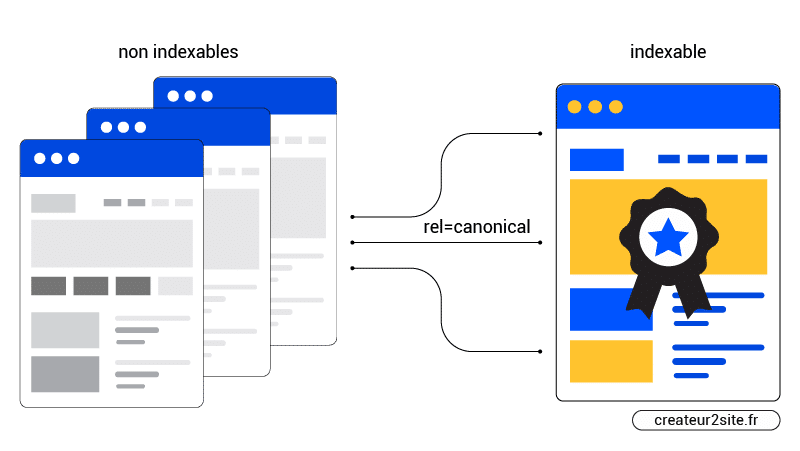
A canonical tag is a snippet of HTML code that defines the main version of a page.
The HTML code:
- link rel=”canonical”: The link in this tag is the main (canonical) version of the page.
- href=”https://example.com/page/”: The canonical page corresponds to this exact URL.
These tags prevent the duplication of identical or very similar pages. In other words, if you have the same or similar content available under different URLs, you can use canonical tags to specify which version is the primary one and should therefore be indexed.
If you think this does not concern you, wait and see.
Why Are Canonical Tags Important?
Crawl bots need to know which content is the original — otherwise they will choose what they find most relevant. So if you do not indicate a canonical URL, they will identify what they think is the best version. And Google does not have all the answers.
If bots identify multiple identical or near-identical pages, they will only choose one to index.
Too much duplicate content can also affect your “crawl budget”. This means Google may end up wasting time crawling multiple versions of the same page instead of discovering other important content on your website.
Duplicate Content?
If you do not feel concerned because you think you have not created content similar enough to be identified as near-identical or even identical — think again.
Why? Google does not see things the way we do — it sees URLs, not pages.
What is the difference? Many factors can come into play, modifying the URL of your page.
Imagine you have an e-commerce site. It is impossible that your product pages do not have filtered URLs, also called parameterised URLs or faceted navigation.
So if you have a page offering a T-shirt in size M / L / XL you potentially already have 3 duplicate URLs.
Here is your original URL:
https://my-ecom-site.com/product/t-shirt/
After applying the filter, your URL will look something like this:
https://my-ecom-site.com/product/t-shirt?size=M
Google sees it as a different URL.
We can go further — if your product page also offers several colours for the same T-shirt:
https://my-ecom-site.com/product/t-shirt?size=M&colour=red
Unfortunately, these are not the only factors that can create duplicate URLs — and this concerns any website if it has been poorly designed.
Here is a list of the most frequent problems:
- Your site is accessible with and without www (e.g., http://example.com and http://www.example.com) — you must therefore choose your preferred domain name.
- Pages are accessible via both http and https (e.g., http://example.com and https://example.com)
- Your page is accessible with and without a trailing slash (e.g., https://example.com/page/ and https://example.com/page)
- Identical URL with and without capital letters (e.g., https://example.com/page/ and https://example.com/Page/)
- Internal site search engine (e.g., example.com?q=search-term)
- Filter navigation (e.g., example.com/blog?category=seo)
- Having AMP and non-AMP versions of a page (e.g., example.com/page and amp.example.com/page)
• …
Imagine all the problems added together. This can create an ENORMOUS number of URLs for a single page! And this is not a complete list.
The Basic Rules of Canonical URLs
To correctly implement canonical URLs, you must follow five rules:
Use Absolute URLs
John Mueller clarified on Twitter that it is recommended to use absolute URLs to ensure they are interpreted correctly.
You must therefore use this structure:
<link rel=”canonical” href=”https://example.com/example-page/” />
And not this one:
<link rel=”canonical” href=”/example-page/” />
2. Use Lowercase
Make sure your server forces URLs to lowercase and that your canonical tags have no capital letters.
3. Allow Access Only Via HTTPS
If you have moved to an SSL certificate, make sure to verify that your URLs cannot be reached via HTTP. Including for your images.
4. Always Place Canonical URLs
If you were not sure, the answer is here. Always place canonical URLs on your pages. In SEO jargon, this is called self-referential canonical tags.
If you use WordPress with Yoast, know that there are always self-referential canonical URLs by default. If Yoast does indeed offer in a page’s advanced settings the addition of a canonical tag, it is only for the purpose of specifying a different URL than the one entered by default. Therefore, the URL you entered when creating your page equals the canonical tag created by default.
Even if your site is perfectly well built, this avoids for example Google getting confused if someone links to you while omitting the trailing slash at the end of the URL. That is why it is always good to apply this practice in any case.
5. One, and Only One, Canonical Tag Per Page
If a page has multiple canonical tags, Google will not consider any of them. Failing to determine the right one, it will ignore both.
Implement Canonical Tags Correctly
There are five known ways to specify canonical URLs. These are called canonicalisation signals:
- HTML tag (rel=canonical)
- 301 redirect
- HTTP header
- Sitemap
- Internal links
We will see next four major points to consider — the interest of the sitemap and internal links as canonical suggestions having just been mentioned. In practice, they are so obvious that I will not insult you by explaining them.
1. Choose the Right Canonicalisation Signal
To know the advantages and disadvantages of each method, consult this table, taken from Google’s SEO documentation:
|
Method and description |
|||
|---|---|---|---|
|
rel=canonical tag |
Add a <link> tag to the code of all duplicate pages, redirecting to the canonical page.
|
||
|
HTTP rel=canonical header |
Send a rel=canonical header in your page’s response.
|
||
|
Define your canonical pages in a sitemap.
|
|||
|
Use 301 redirects to tell Googlebot that a redirect URL is a better version than a given URL. Use this method only when you are abandoning a duplicate page. |
|||
|
If one of your variants is an AMP page, you will need to follow the AMP guidelines to indicate the canonical page and the AMP variant. |
Note: https://developers.google.com/search/docs/advanced/crawling/consolidate-duplicate-urls?hl=en
2. Define Canonicals with 301 Redirects
Use 301 redirects when you want to send traffic from a duplicate URL to its canonical version.
Suppose your page is accessible at the following URLs:
- example.com
- example.com/index.php
- example.com/home/
Choose one URL as canonical and redirect the other URLs to the canonical URL.
You should do the same for the HTTPS/HTTP and www/non-www secure versions of your site. Choose a canonical version and redirect the others to that version.
Note: for WordPress, Yoast SEO offers redirections in the premium plan. Better yet, Kinsta, a premium WP hosting, offers 301 & 302 redirections directly on the server side.
3. HTTP Header
For documents such as PDFs, there is no way to place canonical tags in the <head> section.
In this case, you must use HTTP headers to define canonical URLs.
Imagine you publish a PDF — here is what your HTTP header for this file might look like:
HTTP/1.1 200 OK
Content-Type: application/pdf
Link: <https://your-site.com/page/canonical/>; rel=”canonical”
4. CMS & Canonical
If you use WordPress and Yoast, as mentioned previously canonical tags are automatically created with each page creation.
And this also applies to popular CMS platforms such as:
- Shopify
- Webflow
- Squarespace
- Wix
5 Common Canonical Tag Mistakes
Here is a short list of frequent canonical tag problems.
In all cases, use crawl tools and more generalist tools like SEMrush and Google Search Console to check the health of your website.
1. Thinking a CMS Protects You
Just because your CMS automatically creates self-referential canonical tags does not mean you are protected.
Moreover, canonical tags are suggestions — if Google wants for a strange reason to not follow your recommendations, it can.
A well-built site, based on a self-referential canonical URL, is ideal.
That is to say, you should at least check whether:
- You have correctly configured https (forced http → https redirect) — this should be done if you have correctly implemented SSL on your WP admin
- Correctly configure your main domain choice (forced redirect www.site → site or site → www.site; but not both)
Note: if you use WordPress with Kinsta hosting, it only takes one click to force HTTPS (if necessary). It also only takes one click on a button to choose your preferred domain.
2. Canonicalising All Paginated Pages to the Parent Page
Paginated pages should not be canonicalised to the first paginated page in the series.
For example, a blog with pagination is a blog that lists multiple articles across multiple pages.
In this case, self-referencing canonicals must be used on all paginated pages and not pointing to the first page.
Indeed, John Mueller from Google specified on Reddit that this was a bad use of rel=canonical.
That is, page 2 is not equivalent to page 1, so the rel=canonical must be self-referenced to page 2. And so on.
3. The Canonical Page Is Not the Same as the One in the Sitemap
A sitemap allows you to indicate canonical URL suggestions to the bot — so do not use a different URL version between the canonical tag and the one specified in your sitemap.
4. The Open Graph URL Does Not Match the Canonical URL
Check whether the specified canonical URL is the same as the specified Open Graph URL. Otherwise, a non-canonical version of a page will be shared on social media.
5. The Non-Canonical URL Gets Backlinks
If one or more non-canonical pages appear in search results and generate organic search traffic, check that the rel=canonical tags are correctly configured on those pages.
Audit Your Site: Understanding and Fixing Errors
Whether you think you have a canonical URL problem or not — if you do not audit your site you cannot know. Look at what Google Search Console tells you.
For this, use the URL Inspection tool in Google Search Console to see whether they consider the specified canonical URL as canonical. If there is a mismatch, look for the source of the problem.
However, GSC works slowly — so if you want to fix an error once it has already been reported on the console, it is very likely that it has already impacted your rankings. That is why it is preferable to use monitoring tools. SEMrush and/or Ahrefs can be sufficient to inform you (among other things) of canonical problems.