
Every search engine uses crawl bots that crawl web pages. The goal is to find all pages on the web, then analyse them and potentially index them in search results.
The crawler is called a robot. There are many robot names for each search engine, such as:
- Googlebot
- Bingbot
- Yandexbot
- DuckDuckbot
- …
The SEO community often refers to Googlebot when talking about crawl bots or crawlers. Simply because 92% of searches are done via Google and the 8% are shared among all other engines. Moreover, the majority of other search engines use more or less the same approach as Google — whether for bots, ranking factors, etc.
There are a multitude of factors through which the bot will find your pages. We can name a few examples such as:
- Identification of an internal or external link pointing to this page
- The page was requested for crawling in Google Search Console (just because a page is submitted for crawling does not mean it can be crawled or indexed)
- Identification via Google Ads
- etc.
After this, Google will apply a gigantic decision tree to potentially qualify it for indexation.
Crawl optimisation is the cornerstone of technical SEO.
The Algorithms Behind Googlebot’s Exploration
Once a page has been identified by the crawler, Googlebot determines the site’s location, then the bot does what is called rendering — seeing the page as a user would see it in evergreen mode (with the latest version of Chrome).
It wants to see the page as it appears to users and breaks it down into several pieces.
When you look at a page, you can distinguish a menu, the full content, etc.
Index bots operate in the same way to better analyse a page. They go even further by splitting the site into different blocks: the full content, menus, footers, metas, H(n) heading tags, etc.
The bot then retrieves the HTML code of the page, the CSS, JS or other externalised file, and the URLs contained in the HTML code. It then sends all this information into a decision tree for indexation.
A crawler is the first interface the search engine will have with websites’ web pages.

1. Initially the bot does not know where your site is located. The robot knows that the page is www.example.com but it must find the physical location it is linked to. Somewhere on the web, it must match it to a physical address, otherwise it does not know how to get there. To know where it is, it will access the DNS (domain name service) to find the correspondence between the address and the physical location (server, IP address, where should it request such a web page…). Once it knows where to find the page, it explores it.
2. Then comes the syntactic analysis of the page. This is when Google fragments the different parts of the page.
3. In the third step, it wonders if it has already seen the content. We say it checks whether the document is duplicated. The duplication analysis of a document takes place at the time of crawling.
Each time a document is crawled, it checks whether this content is duplicated. It is precisely at this moment — that is, at crawl time — that the duplication analysis is performed. Depending on how many times a document is considered duplicated relative to its index, Google will decide through a complex arbitration model (decision tree) whether the document’s content is relevant or not.
Google’s patent describes very precisely what it does:

We look at the type of document crawled (html, pdf…).
Then we look at what happens — are there redirects?
Google can then find the parent URL, check if the webmaster has specified a canonical URL, and decide through arbitration the original content of this page — whether it is from the same site or an external site.
It then takes the best of the 2 pages (or Xn pages).
If your page is duplicated from another site, then the original content will go back to the other site and none of your X duplicate contents will be indexed. If a page on your site is considered duplicated with another page on your own site, it chooses one of the two.
One of the main parameters for distinguishing the original from the copy for an external site is notably the difference in popularity. In any case, remember that you can be penalised for the indexation of these pages if content is duplicated between your own site or between external sites. And by penalised, I only mean the non-indexation of your concerned page(s) — but this will not impact the other pages of your site.
4. Then the search engine passes through other filters to examine the relevance of your content. One of these filters is the domain name. Google will arbitrate that the cost-reward ratio is not interesting — it is expensive to run the algorithms for nothing. Which means that for the domain name it will apply more or fewer filters.
Statistically, .edu and .gov domains have very little spam. On the other hand, there is a much higher chance that these filters will find something on other types of domains like .biz. So as soon as it sees a statistically spammy domain extension, it will deploy its arsenal of spam filters. Moreover, it is possible that the anti-spam filter algorithms produce false positives (or false negatives).
The algorithm can make mistakes and decide not to index your page even though it is relevant. So the ideal is to use a “good” TLD (domain extension). The domain name is not a ranking factor in itself but still plays an SEO role in the context of crawling and spam filters. There are still all sorts of other URL filter criteria, like anchors and many others.
5. Elimination of duplicate URLs — it chooses the best page to index and potentially follows the webmaster’s recommendations if a canonical URL has been specified, although it will be the sole judge.
6. Other processing…
Here is an image describing these properties from the patent in question:

You can see that we cannot cover all the different things Google does during crawling to determine indexation, although we have prioritised the most important ones.
Once it has done all these things, it continues exploring by detecting all links on the page — whether internal or external — and the bot then follows these links to visit other pages, thereby browsing the web. It searches for other pages all day, retrieves code, sends it to different algorithms and starts again. Googlebot explores billions of websites per day. Yes, it is enormous and it is expensive! It must crawl “all” pages progressively to detect the new ranking potential of a page, and to find new pages on a site and index them.
There are millions of small agents (robots) that communicate and synchronise with each other via a database.
Crawling Is Difficult
The web contains several billion websites with potentially trillions of pages. It is inevitable that there need to be thousands or even millions of robots to browse the web and work in parallel. It is important to note that Google (and other engines) avoids crawling low-quality pages. They have no interest in indexing poor or unusable content, or even content that is too difficult and costly to process such as JS Frameworks (https://www.search-foresight.com/bonnes-pratiques-seo-frameworks-javascript/). You must make their work easier, notably with a sitemap and a robots.txt.
Crawl and Speed
A good crawler must be fast to limit costs — but is your site fast? Does it have good code quality, good server quality… Google has every interest in the web being fast. If a page takes one second instead of ten, the cost is ten times lower. Google has long been promoting a fast web and makes available all sorts of tools to optimise site speed such as Google PageSpeed Insights. This is therefore what will interest us in this second section: the impact of speed on crawling.
Crawl Quota Is Site Speed
Google has more and more sites and pages and must at some point arbitrate the resources it will use on a given site. This is where we talk about crawl quota — Google decides how many times it will visit your site based on several criteria. There is no exact defined number or estimate to know your crawl budget relative to your site.
However, what we know is that the crawl quota, also called crawl budget, depends mainly on the time spent on a site. We can detail the budget assigned to you more broadly by breaking it down by number of pages relative to page weight/size and relative to code and server-side optimisation.
You can see on this curve that when the time spent downloading is reduced, the number of pages crawled/downloaded increases. The crawl quota therefore largely depends on the time spent on a page. In general, the crawl quota becomes problematic when you exceed thousands of pages. But if your site is very slow, if there are duplicate URLs from parameterised URLs for example, if there is no “preferred domain” — meaning it must crawl each version with and without www (and many other factors) — your 200-page site can quickly become a 500-page crawl for Google. If you add a site that is slower than average to that, your crawl quota can very quickly be exceeded. It is also important to avoid negative HTTP status codes.
New pages will not be discovered and/or old pages will no longer be analysed, and therefore your ranking level will be almost zero.
Tip: To see Googlebot appearances and estimate your own crawl quota/Googlebot appearance frequency you can use tools like “Oncrawl” by uploading your logs.
Should I Worry About Crawling?
Favouring a well-built, well-designed site for SEO is inevitably a good thing — especially since Google loves having its work made easier. Moreover, if you want a site that generates SEO traffic you will need content and therefore many pages. If you are here it is because you want to rank and you will put everything in place to do so, right?
So do things correctly. Build a sitemap, a robots.txt and improve your pages’ speed — which will be good for the crawl budget but also for user experience and its pure ranking factor (page experience).
Optimising Your Crawl Budget
To optimise your crawl quota you must:
- Improve site speed.
- Freshen up the site: delete pages or block them from crawling with the robots.txt file.
- Avoid externalised JS and CSS as much as possible.
- Only show the right pages.
Robots.txt
The robots.txt is always taken into account by crawl bots. The bot first visits the robots.txt to know its directives during its exploration. It then performs its crawl taking into account what you told it to crawl. It is therefore important to take advantage of this to add non-crawlable pages to those to which you have added noindex tags, for example. Here are some syntax examples:
User-agent: *
The asterisk means your directives concern all robots. Otherwise you can specify like this:
User-agent: Googlebot
Disallow: /folder/
Disallow prevents bots from crawling. Here we prevent access to the site directory called “folder”. This would correspond to www.example.com/folder/. At that point the entire folder directory will not be crawled.
Allow: /folder/images
Allow tells user-agents that the directory should be crawled. Here we indicate that the images directory within the “folder” directory should be crawled. If you add the previous disallow, the bot will not explore the folder except the second level concerning only the images of that directory.
Disallow: /*.pdf$
Anything ending in .pdf will not be crawled.
Disallow: /?s=
Blocks indexation of your internal search engine.
Tips: block indexation of faceted navigation for e-commerce sites with the robots.txt.
I strongly invite you to visit https://www.google.com/webmasters/tools/robots-testing-tool/, Google’s robots.txt verification tool, to be certain of your instructions. It would be very dangerous not to verify what you are doing. The tool lets you check errors and see what will happen for a given URL.
Sitemap and Crawl
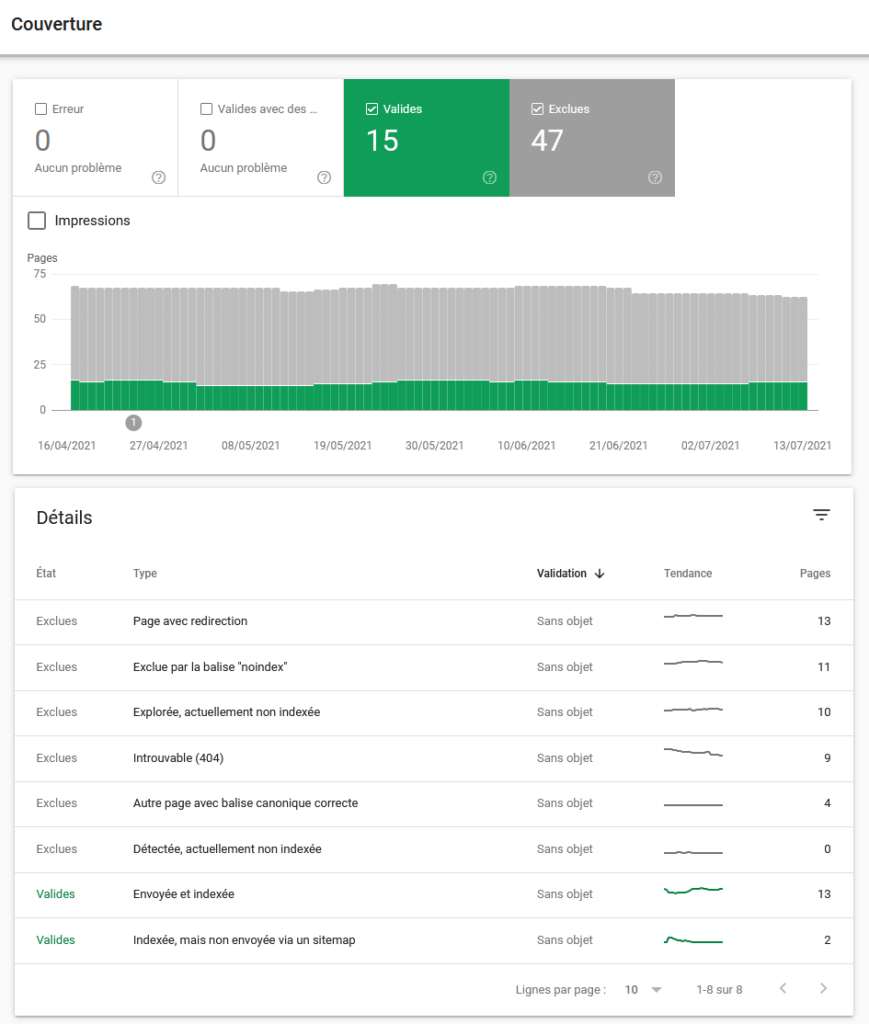
The sitemap.xml is a tree structure of your site. It is important to create one for your website, whatever the number of pages (except single-page sites). Once created, do not forget to submit it to GSC to facilitate crawling and to correctly indicate your sitemap’s location in your robots.txt. You must then check in the GSC report that all URLs are valid.
If there are errors you must investigate them. You will find all this information in the coverage report:
Crawlable Does Not Mean Crawled and Even Less So Indexed
The ideal would be: number of crawlable pages = number of crawled pages. But many reasons can prevent this, as seen previously. Crawl optimisation is not automatic — so if it has not been done, you will likely need to improve your crawl budget.
Know that a crawled page is also not necessarily an indexed page, notably:
- If the crawl is blocked by the robots.txt file.
- If the page is an orphan and cannot be found in the site/site architecture. Even if the page is present in the sitemap.xml, not including it in the site is a practice to ban.
- If it is too deep in the site’s tree structure — a page must be accessible within a maximum of 4 clicks by the crawl bot.
- The page is password-protected
- There is a redirect
- etc.
To summarise: the page is crawled, then is the page accepted or not? If yes, it is added to the index. The ideal is obviously that the number of indexable pages is well indexed. If it is not crawled it cannot be indexed, but that does not mean it will be indexed if it does not pass Google’s algorithms.
If everything is perfect, the number of crawlable pages equals the number of crawled pages which equals the number of indexable pages which equals the number of indexed pages.
Analysing Crawl Frequency on Your Site
There are a multitude of different ways to analyse the frequency of Googlebot visits and thus determine the crawl frequency — and therefore your own quota. We will look at several different methods in this chapter.
Googlebot with Google
You can get the date of Googlebot’s last visit by typing in Google (not your browser): “cache:www.yoursite.com”. It is possible that you cannot see Google’s banner indicating the date of Googlebot’s visit. If this happens you can add &strip=1 at the very end of your page’s URL.
The date is not very precise in the search engine cache. Generally it dates from the second-to-last visit. But for analysing competitors’ sites there are no other means.
Googlebot with Google Search Console
Otherwise, for a much more reliable and probably exact date, you must visit your Google Search Console. For this you need to go to “URL Inspection”.
 If the page is recognised but has been modified since the last crawl, you can request a new indexation or request indexation if the page has not been found.
If you are not sure of the last modification date of your page, it is also possible to see the HTML read by Google. This is interesting to check whether it has the correct version and has correctly detected all the text present on your page.
Analysing a Site’s Crawl
The previous methods allowed you to analyse the last bot visit frequency. There are three months of history to see the last explorations of a page. But doing this for all your pages will take a very long time — so let us look at other methods!
Analysing Crawl with GSC
To analyse the crawl of your site, you can go to GSC → Settings → “Crawl Statistics”: OPEN THE REPORT, which gives: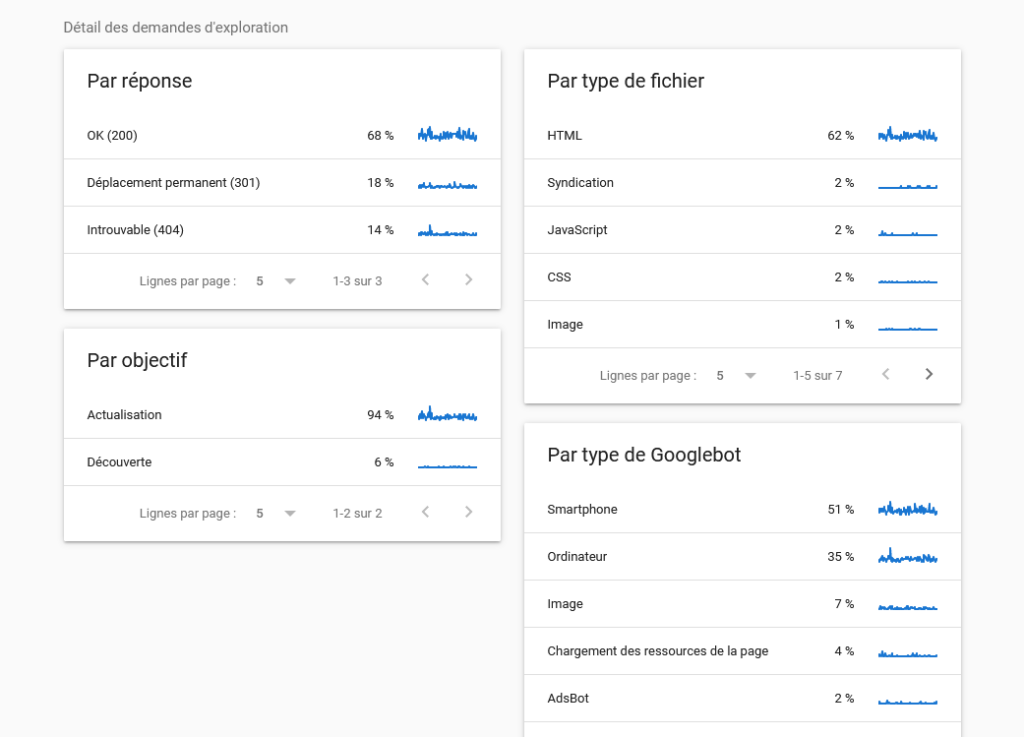
There are two main bot versions: a mobile version and a desktop version. You must therefore not neglect either of these two devices. Is the site mobile-compatible? Is the content identical/similar between desktop and mobile for text, title tags, etc.? Today Google mobile is in the majority but desktop crawling is still quite present. There are also other crawl bots such as image bots, video bots etc.
Doing this check-up is very important to verify the good health of your site. For example if by type, CSS or JS takes up 60% of crawl time, you will need to review those parts and do some cleaning.
Crawl Quota Analysis with SaaS Tools
Although Google Search Console is an indispensable tool, it is just as important to analyse your Googlebot appearance logs via complementary and more manageable tools. This way you can learn much more about these bots — for any search engine in one place — while being able to apply any filter to prioritise your actions.
So I recommend some crawl tools such as:
- OnCrawl
- Botify
- ScreamingFrog
- SEOLyzer
- …