
Are you looking to correctly implement 301 redirects? But also to understand how to use them to increase your organic traffic?
301 redirects are fairly simple to implement and understand — they are used to redirect a web page to another.
But the way they relate to SEO is more complex.
What Is a 301 Redirect?
A 301 redirect indicates the permanent movement of a web page from one location to another, for both users and search engines like Google.
A 301 redirect refers to the HTTP status code of the page.
A 301 redirect tells the browser to redirect this URL to the new one.
In SEO terms, a 301 tells Google that this URL has a new location and that we do not intend to move it again. And Google is fine with that. It transfers the authority built by the page to the new URL. It simply understands that you have changed your URL structure but that the content is the same.
How to Create a 301 Redirect?
There are many ways to create 301 redirects, but the basic method is to modify your site’s .htaccess file. However, if your site uses Nginx, you will not have an .htaccess file.
We will see next how to create a 301 redirect on Nginx and on WordPress.
You will find the .htaccess file in the root folder of your site.
If you do not see the file and you are using Apache, create a text file, save the necessary information, then save it as .htaccess. Upload it to the root of your site using FTP. If you are not sure your site uses Apache, you can check your technology using builtwith.com.
Here are some code snippets to add common types of 301 redirects via .htaccess:
Redirect 301 /old-page.html /new-page.html
301 Redirect on Nginx
To redirect a page to another on Nginx, here is how to proceed in the Nginx configuration:
server {
listen 80;
server_name www.your-domain.com;
rewrite ^/your-page.html$ http://www.your-domain.com/new-page.html permanent;
}
301 Redirect on WordPress
To redirect a URL with a 301 status code on WordPress, the most common and free plugin is “Redirection” (https://wordpress.org/plugins/redirection/).
After uploading the plugin, or after searching and installing it, go to Plugins → Redirection → Settings.
Then, it is as simple as this:

301 Redirect with Yoast SEO (Premium)
If you use the premium plan of Yoast SEO, you will have access to adding/editing redirects including the 301.
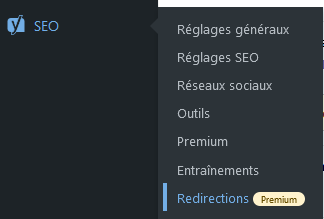
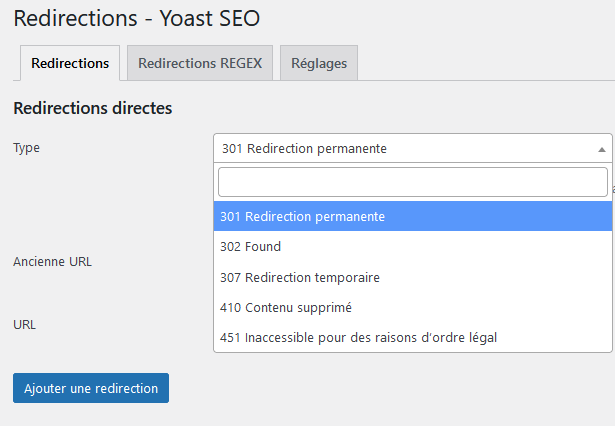
Here are the different redirects available — in this case choose 301, which is moreover the one selected by default:
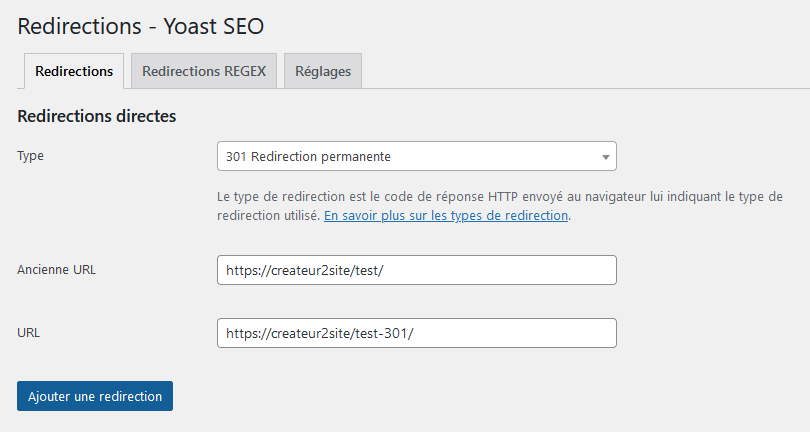
Then, well, to create the redirect, it is very simple:
301 Redirect with Kinsta (WordPress)
If you use Kinsta, the most powerful WordPress hosting on the market, it will allow you to create 301 & 302 redirects directly on the server side:
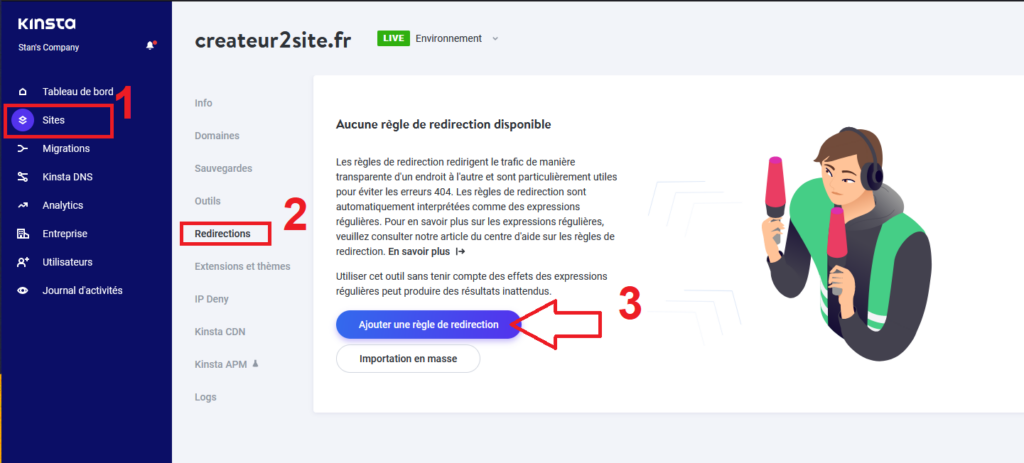
Choose your site, then go to “Redirects” and add a redirect rule.
If you have made or are planning a domain name change, such as for a rebranding, you can do bulk importing!
Once you have clicked, you will be able to choose the redirects between your domains by entering the URL and the rule between 301 and 302:

Be careful because by default the tool selects 302 — make sure to click 301 if you want to create a 301 redirect.
Note: A 302 redirect keeps the old page indexed, which can among other things allow you to redirect to a similar product if it is out of stock. By choosing 301 you guarantee that all of Google’s traffic, backlinks and link juice are now sent to the new URL.
Make sure to add the “^” character before the URL as Kinsta automatically uses Regex expressions:
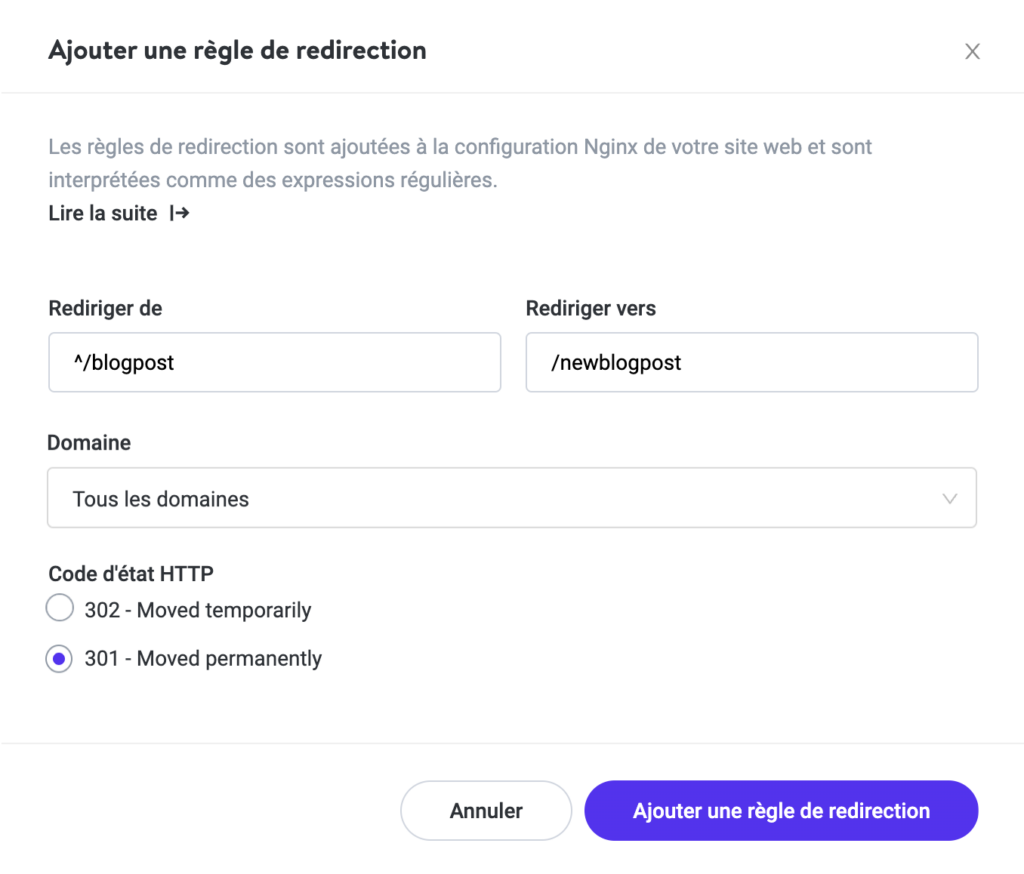
Why do they do this? Because it optimises the process. Thus, in the example above, all links to /blogpost and /blogpost/ (with the slash) will be redirected to /newblogpost. This avoids having to create hundreds of redirects.
If you need help, do not hesitate to ask them — there is only the cream of the crop in their online service, which moreover has no tier-1, 2, 3 support… 😉
If needed, they have created a comprehensive guide on 301 redirects with Kinsta at: https://kinsta.com/help/redirect-rules/
Different 301 Redirect Codes
If you want to do 301 redirects beyond a simple redirect between a page and a new URL, the different codes below may be of interest to you:
301 Redirect from an Old Domain
Several methods exist — here is one of them.
If “RewriteEngine on” is already present in your .htaccess file, do not include it again!
RewriteEngine on
RewriteCond %{HTTP_HOST} ^oldsite.com [NC,OR]
RewriteCond %{HTTP_HOST} ^www.oldsite.com [NC]
RewriteRule ^(.*)$ https://newsite.com/$1 [L,R=301,NC]
301 Redirect www to non-www
To avoid duplication, it is important to choose your preferred domain name.
Warning: The placement and order of code in your .htaccess file are also important. You may encounter undesirable effects if multiple instructions are placed in the “wrong” order (e.g. redirect chains, etc.). If you are planning to implement a large number of 301 redirects in your htaccess file, this is worth examining.
Here is the code:
www to non-www:
RewriteEngine on
RewriteCond %{HTTP_HOST} ^www.example.com [NC]
RewriteRule ^(.*)$ http://example.com/$1 [L,R=301,NC]
non-www to www:
RewriteEngine on
RewriteCond %{HTTP_HOST} ^example.com [NC]
RewriteRule ^(.*)$ http://www.example.com/$1 [L,R=301,NC]
301 Redirect www to non-www (WordPress + Kinsta)
To simply and efficiently redirect your domain name (choosing the preferred domain), just go to Sites → Domains → then click “Make Primary”:
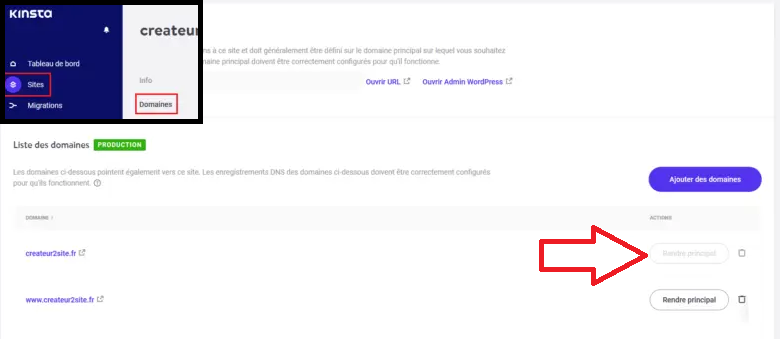
Note: Not familiar with Kinsta? Read our full review of the fastest WordPress hosting on the market.
301 Redirect from HTTP to HTTPS
If you are using an SSL certificate, you can place this code in your htaccess file.
RewriteEngine On
RewriteCond %{HTTPS} off
RewriteRule ^(.*)$ https://%{HTTP_HOST}%{REQUEST_URI} [L,R=301]
HTTP to HTTPS on WordPress
If you have correctly configured your WordPress site, you should not need to apply this change to your htaccess file.
Check here instead:
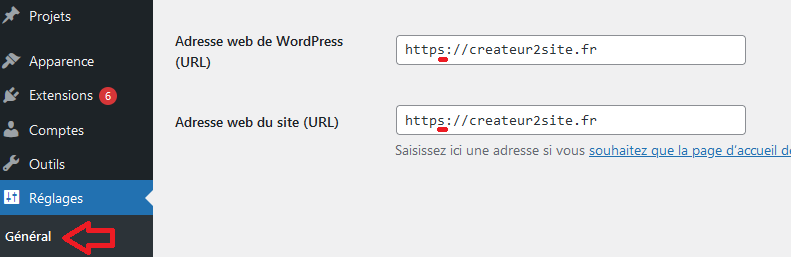
Note: please do not add an extension to put https on WordPress…
If you are hosted on Kinsta, you can also go to Sites → Tools:

Note: in its place you will have an “Enable” button.
301 Redirect and SEO — How Does It Work?
PageRank, or “juice”, is a fluid contained within a page that represents its authority, based on the number of sites that have linked to that page.
It is the number 1 factor for ranking a page. That is why it is important to implement 301 redirects. In the past it was possible to lose around 15% of the power.
To this day, Google’s communication assures that this is no longer the case, and that the 301 no longer causes PageRank loss. Nevertheless, some observe a drop of between 5% and 1%. In any case, you do not really have a choice.
Watch Out for 301 Redirects
If you do not create redirects correctly, you could lose far more than a few percentage points of juice.
So check whether:
- The HTTP version of your site correctly redirects to HTTPS
- Your site correctly redirects from www to non-www (or vice versa — the important thing is to choose one)
- Remove old URLs from your sitemap and replace them with new ones (automatic with Yoast)
- Check redirect chains (Page 1 > Page 2 > Page 3)
- Worse — avoid infinite redirect loops (Page 1 > Page 2 > Page 1 […]).
- Broken redirects where the 301 sends to a 404
- Do not leave 302s indefinitely — switch them to 301
To see all these problems, simply use an audit tool like SEMrush. It is available for free and without a trial period.
Boosting Your SEO with 301s
At this stage, your website should be free of all issues affecting SEO related to 301 redirects.
It is now time to get serious and talk about how we can use the power of redirects to massively increase organic traffic.
Cocktails!
A glass of vodka… A glass of orange juice… Both are good separately but generally better combined. As a fun fact, this is called a Screwdriver.
That is to say, you combine two pages. This allows you to consolidate authority by merging backlinks and to have more comprehensive — and therefore better — content.
Ahrefs had two pages:
They combined them and got x3.
However, this technique should only be used if your contents are “ageing” and cannibalising each other — that is, if they are ranking for the same keywords.
Merger!

Do you know Backlinko? It is one of the top references in English-language SEO. I recommend reading their articles.
In 2019, they decided to acquire a site in the same sector and merge it using 301 redirects. Basically, instead of creating a PBN of sorts, they simply 301 redirected the acquired site to their own.
Did it work?
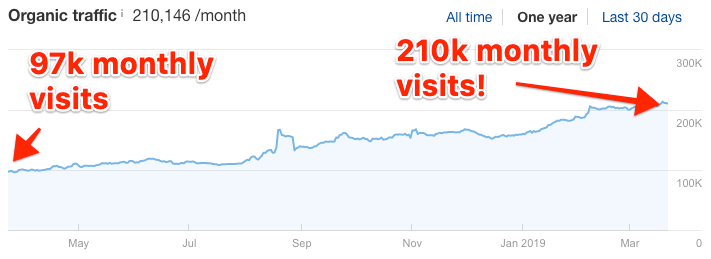
116% in 12 months.
If this strategy is superb in terms of backlinks, do not hesitate to reuse some of the content to maximise everything.