
Google Hummingbird — known as “Google Colibri” in French — is one of the first Google algorithms to add a semantic layer to the search engine. It sits at the core of how Google works.
In use since 2013, it allows Google to understand related queries for semantic search — notably by evaluating and identifying synonyms.
In 2013, Google declared that Hummingbird was the most significant algorithmic update since the Caffeine update in 2010. It is said that Hummingbird affected approximately 90% of all search queries at the time of its introduction.
For example, if you search for “baker”, Hummingbird might return the same search results as “pastry chef” because the semantic proximity of these two words is very close.
How Hummingbird Works
Here is the most likely patent behind Hummingbird, which gives a fairly clear visual representation of what the algorithm does for semantic search:

The patent above can be summarized in a single sentence: search for related words, semantically close to the user’s query, in order to return better search results.
The patent gives the following concrete example:
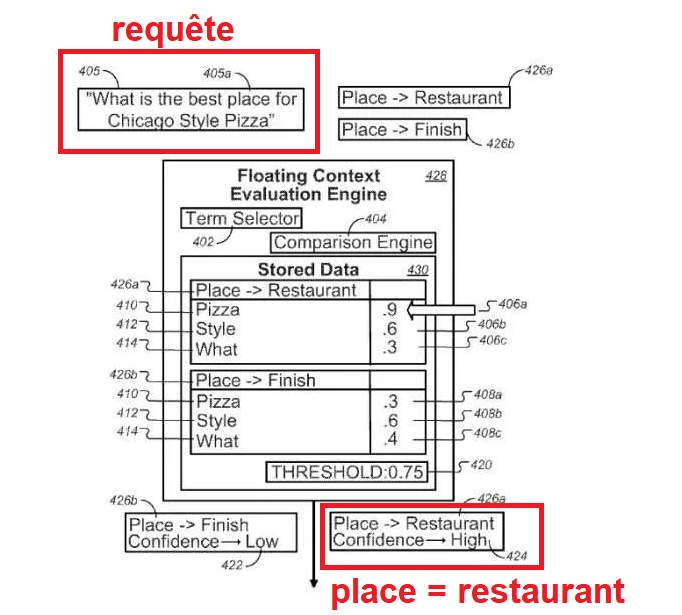
The query is: “What is the best place to find and eat Chicago-style pizza?”
Google then determines that “place” is equivalent to “restaurant” based on context. In this case, this determination is evaluated as highly confident — labeled “Confidence” in the bottom right of the diagram.
This infographic from Brian Dean is probably easier to understand:

You can find the patent at the following address: https://patents.google.com/patent/US9104750B1/en
That is the fundamental operation of Hummingbird. I should also note that this is made possible by word embedding.
Word embedding means placing all words in a language into a vector space, enabling the calculation of the semantic proximity between the closest words — and subsequently enabling the computation of synonyms or similar search intents. That is exactly what Hummingbird does.

Beyond what we’ve just covered, let’s look at what else it enables.
Other functions of Hummingbird
During the Hummingbird conference (https://www.youtube.com/watch?v=9pmPa_KxsAM), it was specified that the update would also enable better understanding of voice search.
It was also noted that Hummingbird would allow Google to better interpret a user’s full query rather than simply matching individual words within the query.
It can also be observed that this algorithm “indirectly” helps combat web spam.
Hummingbird and SEO
Understanding how the Hummingbird algorithm works teaches you that it’s no longer about targeting several different keywords with the same search intent — instead, you should apply semantically similar keywords within one single page.
For example, if you’re targeting the query “most beautiful website”, don’t create a separate page for “best website”.
For example:
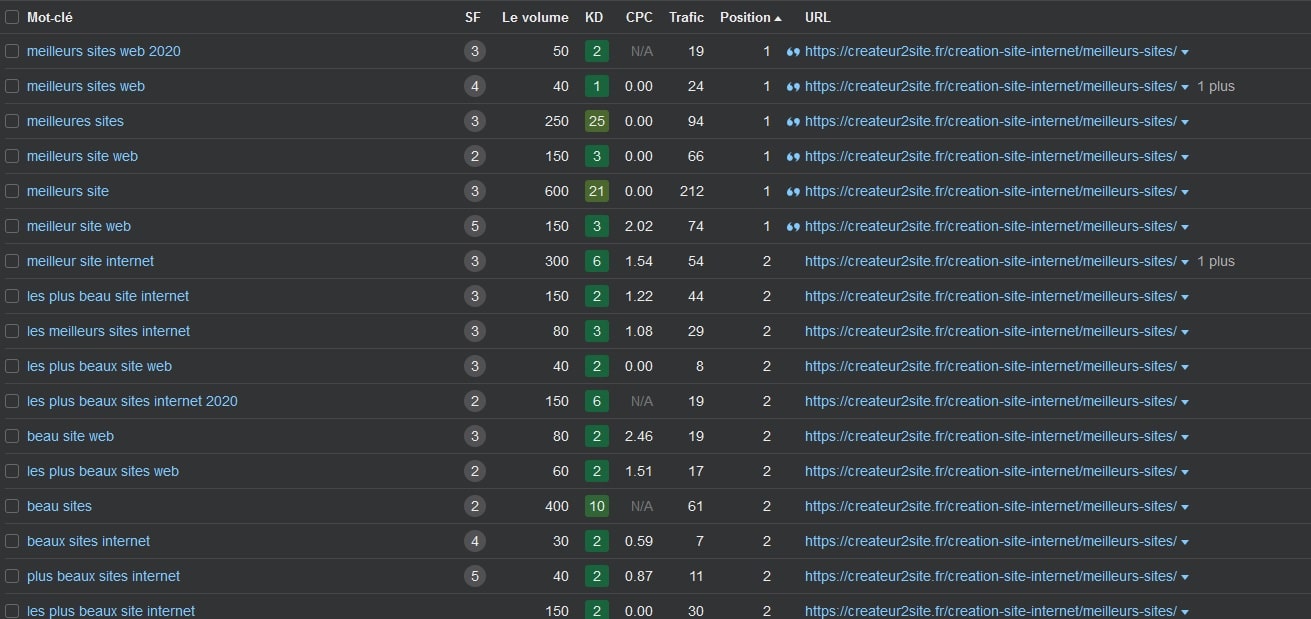
We can clearly see that similar keywords rank for the same search intent.
If you’re curious about semantic SEO, I strongly encourage you to read up on all the Google processes that partially overlap with Hummingbird.
How to optimize for Google Hummingbird?
To optimize for Hummingbird, the best approach is to use different spellings of words and their synonyms.
Users may use different words to search for the same topic — and Hummingbird is aware of this.
It is important to naturally use synonyms and similar words within a piece of content to satisfy all users and their search intent, and also to ensure the search engine can reconcile difficult concepts.
In other words: use keywords that are semantically similar to your main target keywords. Tools like YourTextGuru can help you with this. That’s what optimizing for an algorithm like Hummingbird means. I therefore recommend reading my article on semantic writing.