
You have a nice site and you want it to rank? You are in the right place!
SEO is vital for online businesses, yet it can be confusing to find everything you need in one place. That is the whole point of this article — whether you are a beginner or a seasoned SEO professional, we promise you will find a useful list for all your projects. Not every possible improvement is covered in this article, but you will find the most important ones: proven techniques that work. If you want to invest more time and money in your SEO, or if you have already applied all these improvements, focus on investing more time and money in your netlinking or your content.
Before anything else, if you have not done so already, I invite you to create a Google Analytics (+GA4) account and a Google Search Console account right now, then validate them so you can understand, analyse and repair your natural search engine ranking.
Content may naturally contain affiliate links for certain products I use and love. If you take action (i.e. subscribe, make a purchase) after clicking on one of these links, I will earn coffee money ☕️ which I promise to drink while creating more useful content like this.
Optimise your SEO:
On-site SEO:
- Keyword research
- Content is king
- Optimise your internal linking
- Heading tags H(n)
- Meta title & meta description
- Optimise your images: title, description, Alt tag
- Optimise your URL structure (slug)
Technical SEO:
- Choose your preferred domain
- Canonical tag
- Add and configure your sitemap.xml
- Add and configure your robots.txt
- Integrate Open Graph tags
- Add structured data to your website: Schema Markup & Rich Snippets
- Do you have a 404 page? Is your site on HTTPS?
- Accelerate load time & Core Web Vitals & page experience
- Think mobile first
- Using WordPress? Do not index attachment file pages
Off-site SEO:
- Netlinking (link building)
- Create and optimise your Google My Business page
- Content marketing
- Use the power of social media
Check your SEO regularly (Site health)
A few additional SEO improvement ideas
SEO on-site
1. Keyword research
Introduction and basic principles
To start, analyse. Whether you are creating a new page or improving a current page that is not yet ranking.
Keyword research is essential. You need to do it to avoid creating content on topics nobody is searching for. You also need to ask yourself:
- Are the people searching for this keyword likely to become my customers?
- Can I offer users something better than what already exists?
- Is the keyword competitive?
Creating content for highly competitive keywords will likely be counterproductive. It is better to choose “lighter” keywords and get ranked — particularly by using long-tail keywords. This often means using a longer keyword: the search volume will be lower, but competition will be much less intense. You will also have a much better chance of your keyword having high conversion potential.
Get inside the minds of users
Think about using keywords that users would type when searching.
For example, favour:
“How to appear on the first page of Google”
rather than
“Discover the method to appear on the first page of Google”.
The user will certainly ask Google a question — they are not going to try to guess that they can “discover the method” to get on the first page.
Furthermore, your keyword strategy must now be as conversational as possible, mimicking how users speak and ask questions verbally. Today, with Alexa, Siri and similar tools, this tendency will become even more decisive, as users will ask questions directly as if speaking to a human being — in this case, an artificial intelligence.
Find keywords that are actually searched
Analyse what users ask Google based on your field of activity to understand what they are looking for:
1. You can use Autocomplete — Google helps you!
Note: Using an asterisk (*) will suggest more ideas — you should use it. E.g.: How to improve* your SEO
2. Frequently asked questions
If you scroll down, you will also find other information that may be useful for your targeting.
3. Use Semrush with the Topic Research tool
4. Research questions that users are asking with 1.fr
Analyse the competition
Note: just because a keyword is competitive does not mean it necessarily generates a lot of searches. Conversely, just because a keyword is heavily searched does not mean it is necessarily competitive (this is what we call a “niche“).
You must therefore either:
- Exploit a niche
Or - Find keywords that are not too competitive (try to find the right balance between search volume and competition)
For this, use Semrush Keyword Overview:
Note: If ranking for a keyword is vital to your business, you should probably pursue it.
The difficulty of a keyword should not necessarily discourage you — rather, it should help you estimate the resources needed to rank for it. If you are ready to fully commit to your SEO and apply all the practices mentioned here, it is possible!
“Picking low-hanging fruit is easy, but those at the top of the tree are often juicier. Does this mean it is not worth picking the ones at the bottom? No — you should always pick them. But you must also plan ahead and get a ladder for the ones at the top.”
2. Content is king
First and foremost, know that content is king. It is therefore about maximising your content — making it as interesting as possible, making it stand out, making it informative, making it answer questions that others have not necessarily answered.
You must follow the “E-A-T” formula: your content must reflect expertise, authority and trustworthiness. And do not forget that you must write content that people actually want to read.
But above all, do not underestimate search intent. What is it? It is what users want to find when they make a Google search. The principle is simple but often forgotten, neglected and insufficiently exploited.
Check your competitors’ results for your query:
- Type: Is it mainly blog posts, product pages, landing pages or product category pages?
- Format: Is it mainly lists, how-to guides, tutorials, opinion pieces, comparisons, reviews or something else?
- Angle: For beginners, in 2021, etc.
You can still take the risk of not following the crowd and offering different content if you believe you will make the answer better for users — more relevant, more helpful, etc.
Search intent may seem obvious to you — and that is exactly the mistake to avoid. For example, if you want to write an article about making a chocolate cake quickly, you will write a list — that is logical, and it happens to be what the user is looking for. So let us say the user searches: “quick chocolate cake recipe” and the currently shortest result takes 10 minutes to make. Yet perhaps with 10 extra minutes of cooking time the cake would be better, and you might be tempted to offer a 20-minute chocolate cake for your readers. But you should offer a recipe in 5 minutes flat. The user does not want a 20-minute recipe — even if yours is better and it is true — they are in a hurry!
If you can decipher the perfect search intent, the ranking is yours. Some blogs that managed to decipher it and were already ranked increased their traffic by ~700%, simply by optimising for search intent.
You can also use tools such as Semrush to optimise your content.
Or 1.fr, which gives you important information for adding keywords and assessing the relevance of your text.
Depending on the context, aim for pages with the most words possible. On average, ~1,000 words would be ideal. For content marketing (blog posts) you can go much higher — such as 5,000 words. Include images, videos and sidebar links — whether from your own site or another.
The original purpose of a search engine remains above all to show you the most relevant result possible for your request — which is why it is said that content is king. In truth, if your page and domain have no backlinks in a moderately competitive field, it will be impossible to rank there. But you absolutely must cherish your content — it must be “epic”.
3. Optimise your internal linking
Internal linking is something fairly natural but can easily be optimised for very significant benefits. The greatest SEO impact comes from links — having a well-organised and well-optimised structure shows Google that you are an expert in your field. It is also important for passing the power of your pages to other pages. But those other pages can also improve pages that already have the most juice. Internal linking consists of placing a link on your page pointing to another page on your site, which passes “SEO juice” between your pages. You already do this by placing links in your menu or footer. But you must also place links within page content to further increase the power of the SEO juice (PageRank) — more so than links in the menu or footer, as per Google’s reasonable surfer patent. For example, if you have a dedicated article on user experience and you mention user experience in your SEO article, do not hesitate to link that phrase to your dedicated article.
The silo — the foundation of internal linking:
- Content must share a closely related theme.
- Content of the same theme must link to each other.
- Always think about user intent and needs. Internal linking is a question of logic — do not create links everywhere and haphazardly.
- Place links within the body of the page and pay attention to the anchor text of the URL.
4. Heading tags H(n)
Heading tags such as <H1> are not there to make your text bigger. They give search engines information about whether your page is structured and logical. Use heading tags to insert your most important keywords and rank better in search engines.
Do not use heading tags in your menus. Use them without overusing them — do not repeat the same keyword three times in a single tag hoping to rank better. Over-optimisation is penalised by Google.
The H1 heading tag is the most important, then H2, then H3 […].
You must have one and only one H1 heading tag per page. Avoid using more than eight words per tag and avoid duplicates.
Finally, think about having a good heading tag architecture.
This means always correctly hierarchising your heading tags. You must not start with an H3 heading tag — always start with an H1, then H2, H3 etc. Logically you should have more H3s than H2s: in our example, we therefore have 1 H1, 2 H2s, 3 H3s and 4 H4s (this is not mandatory). You can therefore take the above image as an example to visualise one possible architecture. If in doubt, you can check your heading tag architecture here, and you can also verify whether all the other elements mentioned previously are properly respected.
5. Meta title & meta description
Optimise your meta titles (~70 characters) and meta descriptions (~180 characters) — include your most important keywords in the metas.
You can also download the Yoast SEO plugin if you use WordPress.
To do this, go to Pages > Edit.
In the page settings, you will find the Yoast options for modifying your metas. Yoast also allows you to see whether the character count is more or less optimal.
6. Optimise your images: title, description, Alt tag
1 – Image names
Never insert images with names such as IMG801225.jpg. Always import your images with names corresponding to the image. If it is a horse by the sea, name it horse-by-sea.jpg. Avoid names that are too long, as well as accents, and prefer hyphens for better interpretation of the filename by Google.
2 – Alternative text or “ALT” tag
The alternative text or “ALT” attribute is read by search engines — you can take advantage of this to add your keywords. Once again, do not stuff your images with keywords. Note that keywords placed in the ALT tag will replace the image if the browser fails to display it.
4 – Add a title, caption and description
The context and content of the page where the image is found, combined with a logical title, caption and description, provide search engines with more information that can improve your natural search engine ranking.
If you use WordPress, you can go to Media and then choose the image you want to optimise.
Here I have not entered any alternative text (ALT), by purely personal choice.
Once again, do not stuff Google. If your image is a background image and has no informational purpose, do not provide any alternative text (alt).
7. Optimise your URL structure (slug)
Example: https://createur2site.fr/en/optimise-your-seo/
• Lowercase only and no accents.
• Use the “-” character as a separator.
• Keep it as short as possible (avoid using unnecessary characters or words).
• Re-use your keywords in the URL (naturally reflects your content).
• Avoid numbers — less understandable for Google than text.
• Avoid dates. Google will more easily guess that your content is old and therefore potentially outdated.
If you use WordPress, the URL structure is not optimised by default. If that is still the case, go to your admin console under:
Settings > Permalinks
SEO TECHNIQUE
1. Choose your preferred domain
Your website is accessible both with “www” and without “www” before your domain name.
For example, if your domain name is my-site.com, users can access your site at both:
→ https://www.mysite.com
→ https://mysite.com
This is not problematic in terms of user experience. However, it is very bad for search engines.
Google will treat these 2 URLs as 2 different websites.
If you do not choose your preferred domain, you will encounter indexation issues, duplicate content issues, and what is known as cannibalisation (meaning your own content will compete with itself, even though it is the same page). There is also the crawl budget to consider. Google sets a crawl “budget” — meaning each time the robot analyses your site and its pages, if it discovers too many URLs that are not optimised, your “budget” may be too small relative to your site. In that case, it will not be able to index all your pages and will not verify your potential new ranking in search results.
To avoid these issues, choose your preferred domain.
How? It depends on the service you use. If you use Kinsta, for example, it is as simple as clicking a single button.
So www or no www? It does not matter — it is your choice! (Personally I prefer without.)
2. Canonical tag
In fact, just like your preferred domain name, avoiding duplicate URLs will make Google’s job easier. You should only allow access to one version of your URLs, so that users and search engines do not visit the wrong URL (your non-“preferred” URL).
You must take letter case and separators into account. For example, the following URLs will load the same content, which means search engines could index all three as three separate pages.
createur2site.fr/en/blog/
createur2site.fr/en/Blog/
createur2site.fr/en/blog
To address this, you can set up redirects that will always point to the page you want — in this case createur2site.fr/en/blog/. Or simply implement a canonical tag that tells Google this URL is the original.
To do this, you must use this HTML code in your <head>:
<link rel=”canonical” href=”https://createur2site.fr/en/blog/” />
If you use WordPress:
Go to: Pages > (choose your page) > Edit
Then find the Yoast settings.
Enter your “original” URL here — for our example: https://createur2site.fr/en/blog/
Canonical tags also serve to prevent other types of URLs from being indexed, such as: example.com/product – example.com/product?color=red.
These are called parameterised URLs and are a common cause of duplicate content, particularly on e-commerce sites with filtered navigation.
3. Add and configure your sitemap.xml
Do you really need a sitemap? Perhaps not — but in any case it will not penalise you, so when in doubt, use one. In my view it is suitable for any site, since logically it makes things easier to understand for Googlebot — and that matters for its crawl quotas (or crawl budget), but also for the indexation of your images, and because Google views pages listed in a sitemap as canonical suggestions.
If you use the WordPress CMS, you can install the Yoast SEO plugin to create your sitemap.
Follow this process: SEO > General Settings > Features > XML Sitemaps, then click “Activate”.
If you do not use WordPress, you can for example use the following sitemap generator: https://www.xml-sitemaps.com/. But this is a very bad idea — you will need to restart the process every time a new page is created (there are also many other factors to take into account). The best solution is to ask a developer to create an automatic solution for your site.
Do not forget to submit your sitemap index to Google Search Console, as well as to Bing Webmaster Tools.
You can also transfer your Google Search Console data to Bing Webmaster Tools.
4. Add and configure your robots.txt
You need to create your robots.txt file at the root of your site. Example: https://my-site.com/robots.txt (and write it correctly)
If you use WordPress, it will be automatically generated upon installation; however you will need to modify it — for example using the Yoast SEO plugin.
Yoast SEO → Tools → File Editor
If you cannot see the file editor, or if you are not using WordPress, you can modify and/or create your robots.txt via FTP (probably here: /www/your-site/public) at the root of your site.
1. Find the URL of your sitemap — probably: your-domain-name/sitemap_index.xml
2. Add this information to your robots.txt:
Sitemap: https://mysite.com/sitemap_index.xml
User-agent: *
(3.) If your site uses WordPress, you must add:
Disallow: /wp-admin/
Allow: /wp-admin/admin-ajax.php
It is possible to further optimise your robots.txt, but the key is to have these elements in place (make sure to include the link to your sitemap index in your robots.txt).
5. Integrate Open Graph tags
For your page to be interpreted by a social network (meaning it displays an image, a title and a description), you must add Open Graph tags.
If you use WordPress along with Yoast SEO, you can follow these procedures:
You can also navigate to the page of your choice and specifically change the Open Graph tags for a single page:
Go to Pages > (choose your page) > Edit
Scroll down to the settings and click on “Social Networks”:
6. Add structured data to your website: Schema Markup & Rich Snippets
Schema markup defines and describes specific information, allowing search engines to precisely analyse your site, your content, your page, its context and other things.
These are all the details about you.
Example:
• Your company name,
• Its postal address,
• …
Here is what that looks like.
This is an SEO criterion to apply to your website (for Google, Bing or Yahoo). Add as much as possible!
Always use the “JSON-LD” format.
For all non-WordPress users, I apologise for not providing the implementation process here; however, these links can be a great help: Google’s Schema Generator or Google docs — introduction to structured data.
Dear WordPress users, you can simply use one of the following plugins:
Yoast SEO → freemium
Schema Pro → Paid: ≈ €70
Both are excellent.
Let us look at these plugins in detail:
1- Yoast SEO
You may have already done this without knowing it, but Yoast offers schemas during the plugin setup — you can also add them later. For example: “General SEO Settings” or “Social Networks”.
In the end, Yoast allows you to do quite a lot of additional things.
Choose your page then edit it. Then go to the Yoast settings and click “Schema”.
Let us say you clicked on your contact page — you can add the schema that tells Google your page is a contact page!
You can also find schema settings for your articles. To do this, go to SEO > SEO Settings > Post Types.
If you feel ready to add any schema at all with Yoast, you can access their docs & API right here: developer yoast schema overview.
2- Schema Pro
First, I want to thank them for providing me with a licence to present the plugin to you. But enough chit-chat — let us take a closer look!
To start, you have access to the “classic” schemas offered by its competitors.
After integrating the “basic” schemas, you will find a selection of additional schema choices to apply.
There are far too many things to cover, so let us just look at what the “Recipe” settings look like.
You can see that the plugin is really comprehensive — it offers 779 schema types, more than enough to find what you need. It also offers Rich Snippets, but let us get to that in a moment.
TIP: Is it possible to use Yoast SEO’s schemas and add them to a more comprehensive dedicated schema plugin?
No. Not automatically.
But do not worry — if you are in this situation, simply go to your FTP — probably at:
/www/my-site*/public/wp-content/themes/theme*-child/functions.php
Then add this code to the functions.php file to disable Yoast’s schemas:
add_filter( ‘wpseo_json_ld_output’, ‘__return_false’ );
Do not forget to check that everything is working correctly — if you need help, contact us.
It is also possible to click an automatic button if you use Schema Pro:
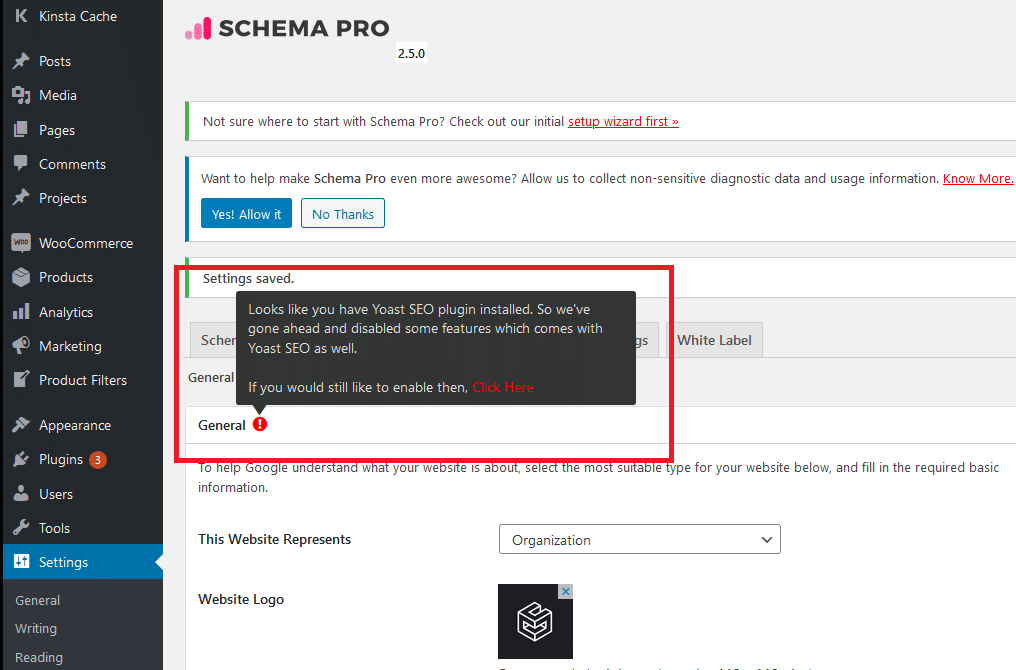 To close this section, test the validity of your schemas here: Google structured data testing tool or Schema.org’s validator.
Rich Snippets or Rich Results
I also invite you to implement Rich Snippets, which are a category of schema. They can therefore be included with your schema plugin.
Here is what a Rich Snippet looks like.
It is more appealing and attractive than a standard search result, is it not?
You can refer to Google’s documentation on Rich Snippets.
If your website is in the food and cooking field and you use WordPress, you can directly use this plugin: All in one schemaorg Rich Snippets.
If you only want Rich Snippets for ratings, you can add the plugin: WP Review.
Remember — we saw that Schema Pro offers Rich Snippets within its schema modules, such as “recipe”.
Otherwise, still with Yoast, you can add “FAQ” Rich Snippets — here is what that looks like.
To do this, open the page on which you want to add your FAQ. Then using the classic editor, click the “+” to add a new block and search for “Yoast FAQ”.
All you need to do is add your questions.
You can verify and test your Rich Snippets here: Google test Rich Results.
It is also possible to obtain Rich Snippets naturally — for example by writing a list in your content.
All of this is also important for voice search:
Use structured data markup and Rich Snippets to give the voice search algorithm more information about your page and your content.
7. Do you have a 404 page? Is your site on HTTPS?
Do you have a 404 page? If you use WordPress, yes — you can however always improve it (explain to users what happened, add a “back to homepage” button, etc.). You must also check that your 404 redirects are working correctly — otherwise it is likely that “pages” like yoursite.com/wp will return a 5xx error when they should redirect to your 404 page.
Is your site on HTTPS? I cannot describe the process here as it depends on your host. However, if you are here, it is almost certainly already in place. If you use WordPress, avoid installing a plugin for everything — including “enabling HTTPS” — for the sake of your site’s security and speed. Try to do things manually as much as possible. Absolute simplicity (downloading a plugin) is rarely a good thing! Do not forget to check that each of your URLs is properly redirected to HTTPS and is not accessible via HTTP, to avoid duplicate pages.
8. Accelerate load time & Core Web Vitals & page experience.
Distinguish between a site’s overall loading speed, Core Web Vitals and page experience.
Accelerate your site’s loading speed
You need to increase the loading speed of your website. In 2018, Google released an update making speed a ranking factor on mobile. Although opinions differ on this, if your site loads faster, users will tend to appreciate the content more and share it more — logically speaking. SEO is not just about pure criteria. Take the opportunity to think about your user experience — which is very important — and apply this best practice. There is also the benefit of improving your crawl budget. So, do it. To go further, we have produced an ultimate guide to speeding up a WordPress site.
Improve your Core Web Vitals
From May 2021, Google began taking into account Core Web Vitals as a new additional ranking criterion! Do not expect your site to be propelled to page 1 of the search engine — this will remain a minor criterion for your SEO. But a criterion nonetheless, one that again favours a user-friendly design.
Core Web Vitals are composed of 3 criteria (there are others, but they “are not part of the Core Web Vitals”):
• LCP → The time it takes for the heaviest element to appear
• FID → The moment when you can interact with page elements (such as a button)
• CLS → Measures the visual stability of the page — whether elements shift (for example, an advert shifting your text)
It is ambiguous, but Google clearly states that hundreds of other signals — including “other Core Web Vitals” — could result in a different ranking. You must therefore improve all Google PageSpeed metrics. We have written a complete article on understanding Core Web Vitals and how to improve these metrics.
Page experience
That is not all! Google declared in its latest news that it would also start using page experience in its ranking systems from mid-June 2021. However, page experience would not play its full role in their ranking systems until the end of August. Data would be added and remodelled gradually — just like Core Web Vitals — so a drastic change was not expected, if that is any reassurance.
You must understand from this news that:
- Core Web Vitals and “page experience” are ranking criteria and are more or less linked. Page experience partly encompasses Core Web Vitals, responsive design, HTTPS and security.
- A good page experience does not replace having relevant, quality content. However, in cases where multiple pages have similar content, page experience becomes much more important for search visibility.
Google has therefore introduced a new experience report directly in Search Console, in addition to the dedicated Core Web Vitals section, so you can check your performance.
You must therefore improve your site speed, Core Web Vitals and therefore the page experience.
Source: Google documentation
Practical implementation
Analyse your site speed with: Pingdom
Make sure to choose a coherent geographic zone. For example, if your site is in English, use a close zone such as Frankfurt or London.
Analyse Core Web Vitals: PageSpeed Insights
Whether with Pingdom or Google PageSpeed, you will receive help and improvement suggestions. However, if you are not a developer, I strongly recommend calling on an expert. There is also WebPageTest, which gives you a wealth of information to improve your speed.
However, if you use WordPress, here are some essential elements you can put in place:
Install the WP Rocket plugin
Tip: avoid free caching plugins — they tend to be much more vulnerable, generate display bugs more frequently, and sometimes slow things down more than anything else.
Install the Perfmatters plugin
Like WP Rocket, Perfmatters will greatly increase your site’s speed. If you like WP Rocket, you will love the complementarity of this plugin.
Install the Imagify plugin
Images consume a lot of resources — use Imagify to optimise your images and also to serve your images in .webp format, an image format designed for the web.
You can also choose to sort your plugins and remove as many as possible. Notably, if you are no longer using a plugin but have simply deactivated it, delete it. Perfmatters can help you load your plugins selectively.
If performance is still not satisfactory, or if you simply want to improve it further, consider switching to Kinsta — the best WordPress hosting. Indeed, all your requests depend on your host. As you will have understood, the most important thing is a good host (and it works perfectly with WP Rocket). But I will spare you all those qualities — they would take too long to mention. For that, I recommend visiting their dedicated page: “Kinsta — why us”. Bear in mind that hosts with prices that seem to defy all competition do not achieve this by chance or luck! “Budget” hosts cannot guarantee your site the same stability and performance as a higher-end host like Kinsta. They will turn out to be far more expensive in the end, as you will need to pay for a multitude of “optional” packages to access features that are included as standard with reliable hosts — or you may fall victim to a “bait-and-switch” commercial strategy that lures you in with an attractive offer and quickly pushes you towards a more expensive one. Beyond their commercial strategies, your site’s performance issues and downtime will destroy your conversion rates and brand identity. The quality criteria for hosts are numerous and complex — a dedicated article would be needed to explain them in detail (which I plan to write one day).
9. Think mobile first
Google now prioritises smartphone optimisation for ranking purposes.
Your site must be responsive (adapted to all screens) — you can check this in Google Search Console or use this link: mobile-friendly test.
Ideally, your mobile website should load in 5 seconds on a 3G connection. Test your speed here: Google mobile speed test (Note: does not account for AMP pages.)
Speaking of which, does AMP improve your SEO? Yes, since it makes your pages faster — but the impact is minimal and not always consistent. On top of that, AMP is far too limited and frequently causes problems. Its real benefit was that Google featured AMP pages in a carousel in search results, but it stopped this “traffic boost” in May 2021. With the coming change to the Top Stories carousel, all web pages — regardless of their page experience status, Core Web Vitals score, with or without AMP — will be eligible for the carousel. So I do not recommend it at all — for me there are far more interesting things to do.
10. Using WordPress? Do not index attachment file pages
Every time you upload an image in WordPress and insert it into a post or page, this creates a separate attachment file page where the image resides.
If you are not careful, Google could start indexing these pages — and since they have no value, this could prove problematic: appearing in your search results, wasting your crawl budget, and other issues.
For example, if someone clicks on an attachment file page in search results, they would only see the indexed image — not the article content. The user is then very likely to leave immediately, which will increase your bounce rate.
Do not wait for this to happen. The Yoast SEO extension has a redirect option to fix this. Go to SEO > Search Appearance, click on the Media tab, and then activate the option “Redirect attachment URLs to the media itself”.
SEO OFF-SITE
1. Netlinking (link building)
Netlinking — also known as link building — is a strategy that consists of obtaining backlinks for your site.
A backlink is simply a link contained in a web page that redirects to your own site. This provides authority or “juice” to your site — bearing in mind that the site sending juice to yours must already be authoritative in Google’s eyes to have a real impact.
Link building is something very complex and subtle that must be handled with expertise. Doing it incorrectly could be very ineffective and could even lower your natural search engine ranking — or worse (Beware of Penguin! Do not buy links for €10). This is the most important criterion in natural SEO. You can use Semrush’s tool to find backlink ideas: Semrush link building.
For effective netlinking, you should primarily check this list:
- The article must be natural.
- The site sending you a backlink must correspond to your field of activity.
- Semantic consistency: if Google does not fully understand the meaning of your text, it will not be able to understand the meaning of the link.
- The linking site must be healthy (TrustFlow & Citation Flow).
- The site must have authority (Domain Authority), but must also be in an authoritative directory (Domain Rating “DR” & URL Rating “UR”). If the domain is strong but the backlink is on a low-quality “partners” page buried deep in the site, it will not be worth much.
- Understand how to use: exact-match anchor, broad anchor, branded anchor, plain URL, generic anchor text, or placing your link on an image.
- Verify that the link is set to dofollow.
To check these elements, you can use Ahrefs and Majestic.
However, I strongly advise you to call on a specialist for this task — be very careful!
Link building also contributes to optimising your internal linking structure. It helps transmit the power of your pages to other pages on your site.
2. Create and optimise your Google My Business page
Create a Google My Business account, then verify your account (for example by entering the code you receive by post).
Use the menu on the left side (or click the top-left corner to open the menu) and fill in as many things as you can.
• Complete as many fields as possible on your listing to boost your performance.
• Respond to the reviews left by your customers and reply as quickly as possible — whether positive or negative! Furthermore, encourage your customers to leave reviews.
• Add a profile picture – cover photo – shared images (as many as possible).
• Create and publish posts; add products if you have any.
• Keep your information up to date.
• You can also activate messaging.
3. Content marketing
Use content marketing — a powerful tool:
• Blog posts
• Infographics
• Surveys, studies & research
• White papers & e-books
• Webinars
Take the opportunity to integrate a newsletter!
It is very worthwhile to adopt this strategy, as in addition to the benefits you can easily imagine, there are probably advantages you are not aware of. Using content marketing on your site could increase your natural search engine ranking and even get you on the first page of search engines without any authority. For example, if a user frequently visits your site — thanks to your blog, for instance — Google will suggest this site during their future searches if the site covers the topic they are asking about. You therefore move up to the first page of search results for that user. You can easily verify this by opening a private browser: do a search you make frequently, then repeat the same query without private mode. The results will be different. Sites you have previously interacted with will appear at the top of the page. But this only truly works with content marketing.
If you are planning to create a blog and want to know more, I invite you to consult these articles: what is content marketing & the greatest misconception in content marketing.
4. Use the power of social media
Have a strong presence and active use of social media. You can also do influencer marketing — partnering with an influencer to talk about you.
Check your SEO regularly (Site health)
Conduct regular SEO audits with tools such as Semrush or ScreamingFrog — a freemium tool.
In particular, check:
– Cannibalisation
You can check your cannibalisation health score with Semrush using the On Page SEO Checker tool — or in more detail by going to Position Tracking > Cannibalisation.
– Negative backlinks
Check whether you have negative backlinks using Semrush’s Backlink Audit tool.
You can disavow URLs to Google if you consider it relevant — for example, if you have toxic backlinks and noticed they had negative repercussions on your ranking, or if you are the victim of a “negative SEO attack”. Go to: Search Console disavow links.
– Update old content
– Check for orphan pages
An orphan page is a “forgotten” page — it is not included in your internal linking structure, meaning no page, footer or menu redirects to it. You can easily check for orphan pages on WordPress by going to Pages > Orphan Content.
– Remove pages that do not generate traffic
If a page is likely to disappoint visitors, has no success in natural search, gets very few visits outside of organic search, and achieves no conversions — you must accept that you lost time writing that article. Make sure you know what you are doing, and if you decide to do it, do it correctly. I recommend 2 very comprehensive articles on this topic: inactive pages & zombie pages.
A few additional SEO improvement ideas
– Add a breadcrumb trail
This is the path the user followed through your site’s structure, from the home page to their current location. If your site sells fashion accessories and the user is on a women’s bracelet page, the breadcrumb displayed might be: “Women’s fashion > Accessories > Jewellery > Bracelets”. Having a breadcrumb trail will likely reinforce your internal linking.
– Frequently asked questions (FAQ) pages
Create one or more FAQ pages to answer users’ questions. Your content excerpts could answer users’ queries — whether via voice search or even to appear as a “Featured Snippet” (this is not the same as Rich Snippets — it is something different).
– Having a multilingual site improves SEO
However, be careful: integrating multilingual from an SEO perspective is not simple and must be meticulous.
Summary of the complete SEO guide
If you have made it this far — congratulations! It was a long read and I thank you for it. I hope that through this article you have learnt how to optimise your SEO and also how to apply it.
The techniques for improving your natural search engine ranking? They will no longer be a secret to you!
If you have any questions or suggestions, do not hesitate to use the comments section below.
Subscribe to the newsletter so you do not miss any of our future articles 🙂