Managing links is the most important thing when talking about search engine ranking. Indeed, the quantity of external links — also called backlinks (and even internal links) — and their quality are the most decisive criteria for appearing in first position on search engines.
Attributes such as nofollow or dofollow allow you to specify instructions to Google regarding links, significantly impacting their power. For users, however, it is impossible to know whether a link has a specific attribute or not without inspecting the HTML code.
What Is the Importance of a Link?
A link allows you to gain authority in Google’s eyes — whether links between your own pages or external sites that mention you. This authority allows you to rank in search results. Links are the most important factors in SEO! It is said that links allow “SEO juice” to flow. This SEO juice is transferred to each of the links present on a page proportionally:
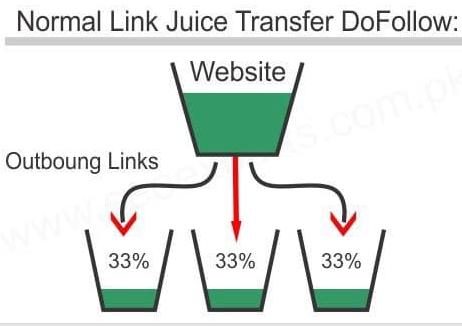
We also talk about PageRank, link juice and much more.
In reality, this presentation of PR distribution is incorrect because of the reasonable surfer model. The juice is not proportional since, depending on the position of a link, the popularity transferred differs.
The Importance of Link Attributes
A link attribute allows you to specify instructions to Google that can be useful in certain situations. In reality, attributes allow you to suggest to Google what it should do with a link — but it is not a directive for it; Google may decide to act otherwise.
The Nofollow Attribute
The “nofollow” link attribute allows you to tell Google that it would be better not to follow this page — meaning Google will not explore the URL of the link. As mentioned earlier, it is possible that Google may decide to follow the link anyway.
One of the advantages is adding this attribute to distance yourself from the external site in Google’s eyes.
As regards linking between your own pages within your site, it is formally inadvisable to use this attribute in any case.
Nofollow and “SEO Juice”
Any good SEO specialist will tell you: nofollow links are by no means to be used for your search engine ranking strategy (internal or external). The only reason would be to add this attribute if you have paid for a link and it has penalised you. Indeed, this practice is contrary to Google’s guidelines; however, Google invites those individuals to replace the links they have paid for with nofollow to get back on the right track.
As for linking between your pages, if you use a nofollow link it does not benefit from SEO juice. Note that just because it does not benefit from it does not mean we can use it to maximise the juice of the other links on a page. To clarify: a nofollow link absorbs the same share of SEO juice as the other links, but it does not benefit from it — this phenomenon is described as a “black hole”. The only way to work around this problem and to be able to “sculpt” your juice is to use link obfuscation and not the “nofollow” attribute.
Tip: it is important to prioritise the power of SEO juice on strategic links rather than allowing it to benefit useless pages such as legal notices, for example. To do this, it is possible to use link obfuscation rather than the nofollow attribute.
Nofollow According to Google
Today, Google wishes to highlight nofollow links that have been overused for everything and anything (such as sponsored links). They therefore state that nofollow links could transmit power just like a dofollow link — but to a certain extent. Does this mean you should place internal links or have external links as nofollow? No, since the power will never be comparable, and it is also completely random.
In the context of a netlinking, or link building strategy, it is advisable to have a small percentage of external links as nofollow — and only for external links. This allows you to appear more natural if you practise buying dofollow links (contrary to Google’s guidelines).
Dofollow (or Follow)
The dofollow attribute allows SEO juice to be transferred to the URL — whether internal or external. This attribute is present by default in a link whether you have mentioned the attribute or not (“dofollow” and “follow” are identical). This means that if you have never added the dofollow attribute, the link is already dofollow (unless you have specified another attribute such as nofollow, of course).
It is really important to prioritise its use. If you reference an external site, you are granting it credit — it would be selfish to send the juice nowhere.
The Code for Adding an Attribute — Nofollow or Other
To add an attribute of any kind, you must place ‘rel=””‘ after the link URL.
Here is what it looks like for the nofollow attribute:
<a href=”https://my-site.com/” rel=”nofollow”>the best of SEO</a>
If you want to add multiple attributes, you will need to separate them with a comma or a space (order has no impact). For a sponsored and nofollow link, it will be:
<a href=”https://my-site.com/” rel=”nofollow sponsored”>the best of SEO</a>
or
<a href=”https://my-site.com/” rel=”nofollow,sponsored”>the best of SEO</a>
How to Check Whether You Have Nofollow Links
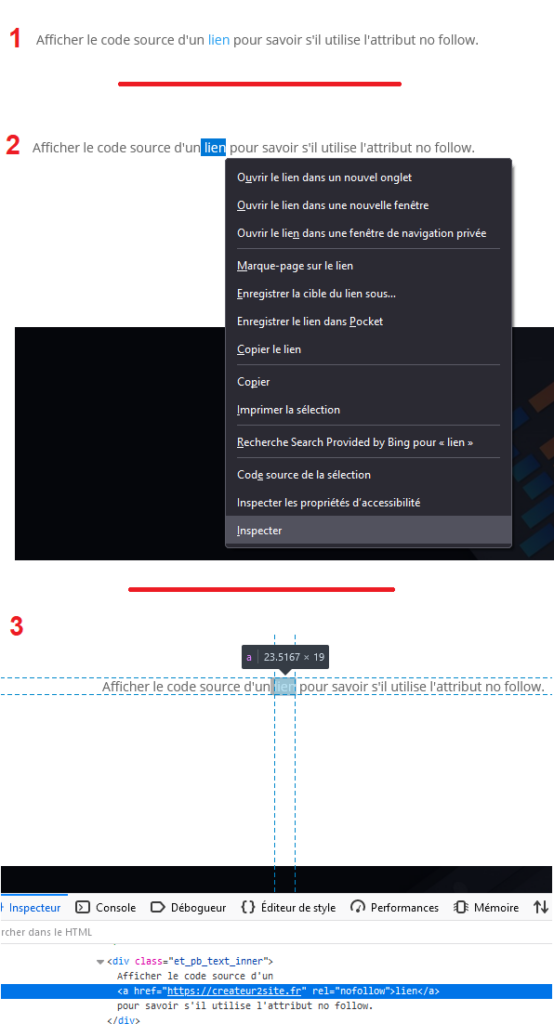
Now that you know the impact of a nofollow link, it would be rather logical to check your link profile. To do this, simply select the link and inspect the element — the source code of the element.
In image form:
Other Link Attributes
There are many other types of link attributes — less widely used but useful.
We can mention:
“ugc” — an attribute that tells Google the link was generated by a user. This type of attribute helps prevent link spam on forums and avoids distributing juice there. Since Google can now follow a nofollow link, it would be wiser to use this attribute for comments on your site.
“sponsored” — this attribute tells Google the link is sponsored; it does not transfer SEO juice, even though, like nofollow, it recovers a portion of the juice. Google states that using sponsored links without mentioning the dedicated attribute is contrary to its guidelines and can affect your search engine ranking.
“noopener” — the attribute provides better security for links that open in a new tab. It is now automatically implemented on WordPress when accompanied by target=”_blank” (new tab). It fixes several security vulnerabilities, notably regarding phishing attacks.
“noreferrer” — noreferrer blocks the information to external sites that a link pointing to them has been attributed. For example, if the site uses Google Analytics to measure the channels generating traffic, your site will not appear in the data.
This attribute was created to increase link security because noopener was not supported by all browsers, but that is no longer the case today. This attribute is also used by default in WordPress for links in new tabs. Be careful, as it should not be used in the context of a partnership — otherwise they will not be able to know you are bringing them traffic. If it is affiliate marketing, your link necessarily has a tracker to measure the number of clicks for your site. It is therefore not really relevant. But if you share links between your own sites, it would be unfortunate not to know whether your sites are being exchanged between internet users.
Note: It is possible to add multiple attributes in the same link — such as “sponsored” and “nofollow” as seen previously. But as for the best practice, Google has never communicated it and remains very secretive about the best usage to adopt. Furthermore, it is impossible to confirm whether you should apply “sponsored” and “nofollow” simultaneously for a sponsored link. In any case, normally, one link attribute should logically suffice.
Summary of Link Attributes:
Link attributes are useful in many cases. They must be known and correctly used. Take this opportunity to check the attributes of your links right now by inspecting the source code of your internal pages to verify they are not using nofollow (or similar) — in which case your site will have zero ranking potential. Also check your external links, whether paid or not. Even if you have not paid for your links, nothing prevents you from having no control — it generally suffices to send a polite email to external sites kindly asking them to change the attribute.