
Adding structured data (schema markup in English) is always mentioned among the levers for technical SEO optimisation. However, let us bust the myth straight away: adding schema tags, or adding bullet-point lists to obtain rich snippets, is not a ranking factor. At least not a direct one. It is an optimisation — like the cherry on a cake. There is little point if you are not already positioned on the first page.
What is a rich snippet (rich result)?
A rich snippet — also called a featured snippet, or rich result — is an appearance in search results that does not look like a simple blue link.

It allows a page to be described more quickly, more visually and with more detail. This is why, when a featured snippet appears, the meta description disappears.
But there can be other types of snippets, such as PAAs (People Also Ask).
Sometimes also called rich results, the distinction is difficult to make — especially since English-language terms are generally used, and even those have several synonyms.
Here are some clarifications — to be taken with a pinch of salt:
- Rich snippets: regular search results with additional information displayed alongside the title, the descriptive code excerpt and the URL.
- Rich results: any type of visually enhanced search result with information extracted from relevant structured data. Rich snippets are one type of rich result.
- SERP features: anything that is not a traditional “blue link” search result. Featured snippets, PPC ads, tweet boxes and knowledge panels are all types of SERP features.
Otherwise, let us simply say that we are doing rich snippets.
The different types of rich result displays
Here are the main possible displays of “SERP features”:
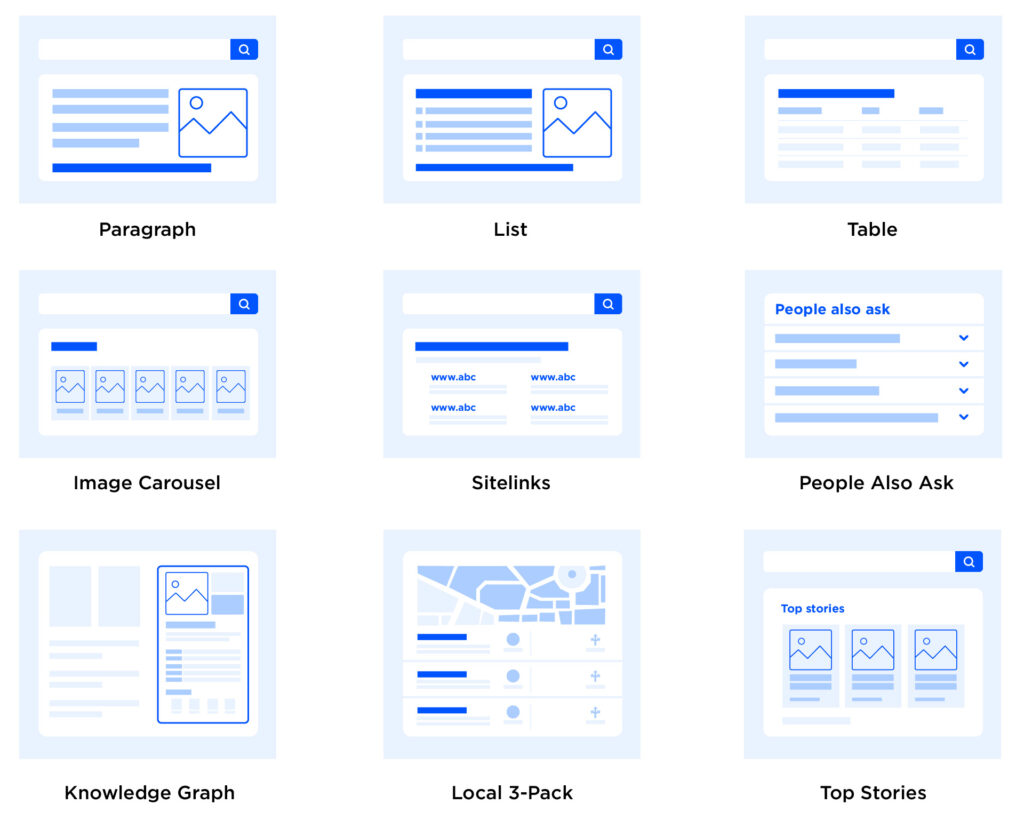
Here are the main rich snippet displays:



And… many more. In fact, there are a huge number. But the main ones are:
- Music.
- Reviews.
- Events.
- Recipes.
- Product markup.
In other words, without structured data, Google and other search engines struggle to understand:
- How long the recipe takes
- Which images are of the recipe itself
- The list of ingredients
- …
This allows the user to better determine which result is of interest to them. Imagine: if they are looking to bake a chocolate cake quickly, they look for the best-rated recipe — and the quickest one to make.
But there are also optimised displays achievable without specifying schema tags — that is, “natural” snippets, such as:
- Various bullet-point lists
- Image / video

Placing these types of elements in your content is therefore very relevant.
What is structured data markup? (schema markup)
Structured data — schema markup in English — allows you to clearly specify to Google that it could use featured snippets.
For example: “It will take 20 minutes to make the pancakes. Better yet, these are low-calorie pancakes — approximately 80 calories per serving.”
Rather than having Google try to extract this information to help the user with their search, you can simply specify this piece of code (simplified) in your page:
cooking time: 20 minutes
calories: 80
More specifically, here is what the markup code looks like:
<script type="application/ld+json">
{
"@context": "https://schema.org",
"@type": "WebPage",
"breadcrumb": "Books > Literature & Fiction > Classics",
"mainEntity":{
"@type": "Book",
"author": "/author/jd_salinger.html",
"bookFormat": "https://schema.org/Paperback",
"datePublished": "1991-05-01",
"image": "catcher-in-the-rye-book-cover.jpg",
"inLanguage": "English",
"isbn": "0316769487",
"name": "The Catcher in the Rye",
"numberOfPages": "224",
"offers": {
"@type": "Offer",
"availability": "https://schema.org/InStock",
"price": "6.99",
"priceCurrency": "USD"
},
"publisher": "Little, Brown, and Company",
"aggregateRating": {
"@type": "AggregateRating",
"ratingValue": "4",
"reviewCount": "3077"
},
"review": [
{
"@type": "Review",
"author": "John Doe",
"datePublished": "2006-05-04",
"name": "A masterpiece of literature",
"reviewBody": "I really enjoyed this book. It captures the essential challenge people face as they try make sense of their lives and grow to adulthood.",
"reviewRating": {
"@type": "Rating",
"ratingValue": "5"
}
},
{
"@type": "Review",
"author": "Bob Smith",
"datePublished": "2006-06-15",
"name": "A good read.",
"reviewBody": "Catcher in the Rye is a fun book. It's a good book to read.",
"reviewRating": "4"
}
]
}
}
</script>
You can find all the different schema tags on the schema.org website.
Schema markup: an SEO optimisation?
As seen at the start of the article, adding structured data is not a ranking factor — John Mueller has confirmed this.
However, it does help with the visibility of your articles/pages, allowing you to obtain more organic visits.
Furthermore, if the addition of structured data leads users to click more on your pages in the SERPs, this will trigger an (indirect) ranking factor due to Learning to Rank. Learning to Rank improves your rankings based on the number of clicks you receive relative to your competitors in search results.
To summarise: if you appear on the first pages of Google, adding structured data could improve your ranking factors, get you more clicks, and therefore more organic visits.
Note: if you are not on the first page but you optimise your site for PAAs (People Also Ask), you could obtain organic traffic without having to compete directly against your competitors.
And finally, using semantic structured data can achieve better rankings in search results through associated semantic SEO optimisation.
How to get rich snippet data?
Now that we have covered the theory, let us move on to practice. But before starting on the actionable techniques for your site, let us first look together at the rich snippets that will suit you.
1. Choose your structured data
There is no point using JSON-LD tags to display the calorie count for your recipe if you run an e-commerce site. I therefore invite you to browse the process of obtaining eligible rich snippets for your content on Google’s dedicated page: https://developers.google.com/search/docs/advanced/structured-data/search-gallery
In any case, here is what you can implement regardless of your field:
- “How-to” markup
- Review markup
- FAQ markup
There are many more options, but they apply to fairly specific website categories — such as recipes, which you saw earlier.
That said, I suggest consulting the documentation if your field involves:
- News, media and entertainment
- Books
- Education
- Events
- Datasets
- Employment-related content
If one of these categories seems relevant to you, consult the .
Note: Implementing FAQ rich snippets is a fairly popular modern SEO tactic for obtaining more pixels on SERPs. Even though it is listed under the product type, it can be used on any page that has an FAQ section.
2. Implementing structured data tags
Do not be afraid — it is very easy to create the markup and deploy it, whatever technology your website is built on.
Let us start by presenting the simplest method for deploying the code in the <head> section of your website.
Here is an example using JSON-LD and FAQ structured data markup:
<head>
<script type="application/ld+json">
{
"@context": "https://schema.org",
"@type": "Page FAQ",
"mainEntity": [{
"@type": "Question",
"name": "Is it difficult to implement such markup?",
"acceptedAnswer": {
"@type": "Answer",
"text": "No, not at all — there are many plugins and markup generators."
}
},{
"@type": "Question",
"name": "Do SEO practitioners benefit from FAQ markup?",
"acceptedAnswer": {
"@type": "Answer",
"text": "Yes, it is a fairly popular tactic. Although it can bring a lot of value in the SERPs, SEO practitioners tend to overuse it. Like adding emojis in the title — they get noticed, but not for the right reasons. Use it sparingly. Follow Google's Guidelines. Just because others do it does not mean you should."
}
}]
}
</script>
</head>
Use the JSON-LD (JavaScript Object Notation for Linked Data) markup format. You will also come across microdata and RDFa. Do not use them. This is what Google officially recommends — and it is also the simplest and cleanest format.
3. Several ways to implement schema markup
Deploying the code in the <head> can be more complex if you use a CMS such as WordPress, Shopify, Webflow, etc.
If you use WordPress, there are many plugins that do it for you. Structured data is supported in multipurpose SEO plugins such as Yoast or Rank Math. There are even plugins designed solely for schema implementation, such as Schema Pro.
Yoast is suitable for the basics: FAQ, “How-To” schema and organisation structured data.
Shopify, Wix, Squarespace
Shopify supports schema markup with certain ready-made themes and apps such as or for SEO. Squarespace can populate very basic markup from your settings.
And Wix relies directly on you to paste the code in Site Menu → Home → Structured Data.
Modifying WordPress’s <head>
If you want to modify the <head> of your CMS, find the appropriate plugin for your solution. Here we take WordPress as an example — there is the “Code Snippets” plugin. But… this will only work for organisation-type markup that applies to all pages of a site. If you want to target specific pages, it will not be possible. In any case, let us stop downloading unnecessary plugins.
You can directly modify the configuration files of your WordPress. If you have a child theme, you can follow this procedure:
Note: Although you can add code snippets directly to your header.php and footer.php files, a better approach is to use your functions.php file and the appropriate WordPress hook. This allows you to keep all your snippets in one place and avoid modifying core theme files.
Go to the functions.php of your child theme. You can edit this file by connecting to your site via FTP. Or you can go to Appearance → Editor and select the functions.php file. Then paste your code at the end of the file:
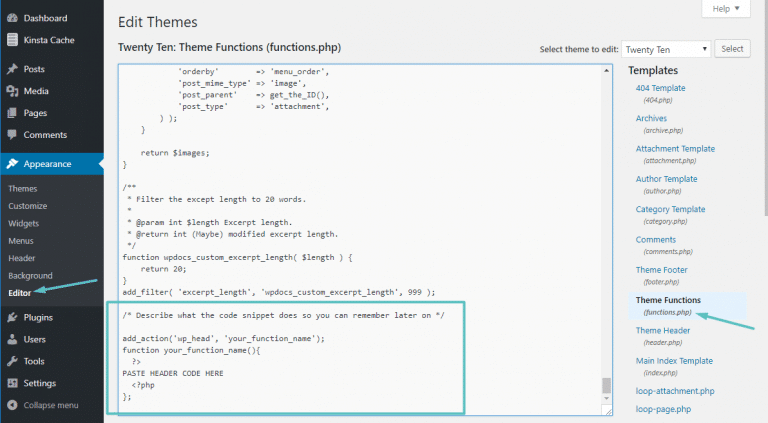
If you want more control over where your header or footer code snippets appear, you can use if statements to add the code only to specific pages on your WordPress site.
For example, to add code snippets only to the header or footer of your home page, you can use:
/* Describe what this rich snippet corresponds to, so you can find it easily */
add_action('wp_head', 'your_function_name');
function your_function_name(){
?>
PASTE YOUR STRUCTURED DATA HERE
<?php
};
Another option is to add code snippets only to specific articles or pages. To do this, you can use this code snippet:
/* Describe what this rich snippet corresponds to, so you can find it easily */
add_action('wp_head', 'your_function_name');
function your_function_name(){
if(is_single(73790)) { ?>
PASTE YOUR STRUCTURED DATA HERE
<?php }
};
Yoast SEO – Schema markup
If you use the Yoast SEO plugin, there is already a strong chance that you have added structured data without knowing it. The most well-known markup being “organisation”. So, if you have entered your organisation type, Yoast has already added your structured data to your <head>:

Inspecting the code, here is what it produces:

But that is not all — Yoast offers many other schema markup additions.
When creating a page, it is possible to add FAQ markup:

You simply need to add your questions:
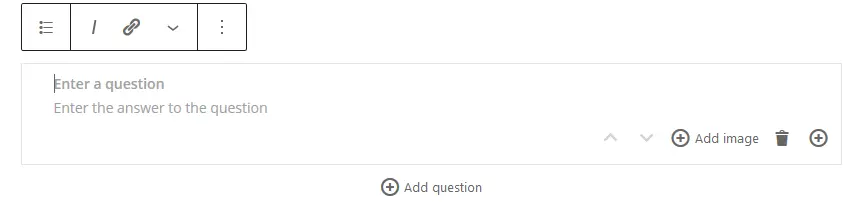
Finally, it is also possible to add “page categories” with structured data. To do this, go to a dedicated page and click on “Schema”:
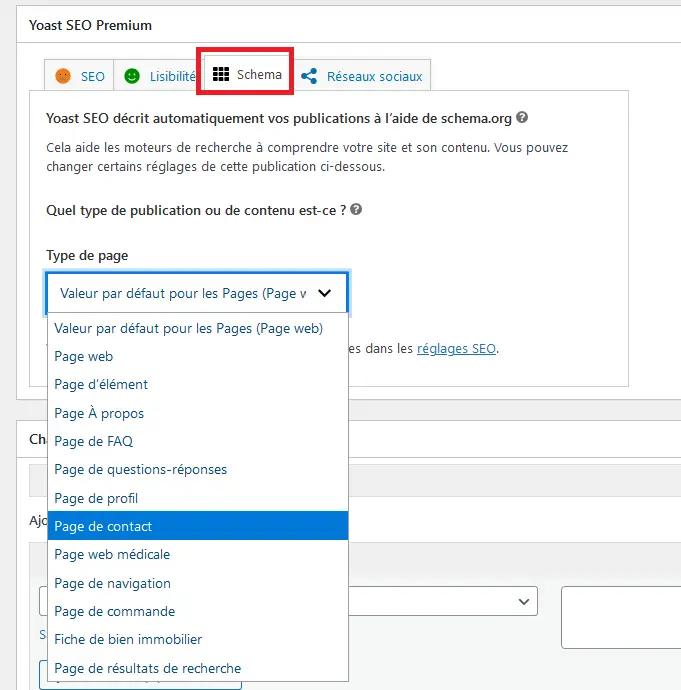
You can also find schema settings for your articles. To do this, go to SEO > SEO Settings > Post Types:
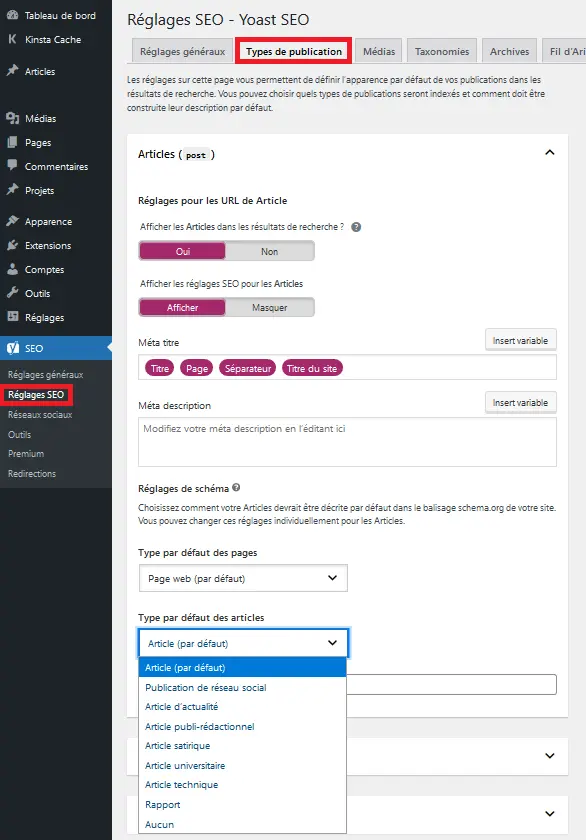
Finally, know that it is possible to add ANY SCHEMA to Yoast SEO by getting your hands dirty and using their documentation & API. The link: .
If that concerns you, the Schema Pro plugin is a dedicated schema markup plugin for WordPress offering 779 schema types. It is also possible to click a button from their plugin to disable Yoast schemas while keeping the Yoast plugin active.
No more excuses for not implementing structured data markup!
Quick Win: implementing markup with GTM
If you use Google Analytics, Google Ads, Google Optimize and other Google tools to improve your site, you are almost certainly familiar with GTM — Google Tag Manager. GTM, roughly speaking, allows you to gather all the pieces of code from various applications and bring them together into a single place. This is easier to manage, easier to update, and speeds up page loading.
Know that, if you do not know how to implement your structured data, it is possible to apply them using GTM.
Google has a dedicated page where everything is explained in detail. There is no point duplicating or summarising this section — I invite you to consult their dedicated articles directly:
Note: The page is available in French!
Create your structured data easily
Now that you know how to implement your structured data whatever your technology, you probably want to know what code to write.
For this, the simplest option is to use the structured data generator provided by Google:
https://www.google.com/webmasters/markup-helper/u/0/

Otherwise, go to schema.org — you will have access to all schemas, with ready-made JSON-LDs.
Verify your structured data
Worried you may have done something wrong? Do not panic — it is very easy to verify the code you have generated or borrowed. To do this, use Google’s “” tool:

By default, Google offers to verify the structured data of your current site. But you can also verify your code before sending it to your site.
Verifying structured data with Google Search Console
If you are an SEO practitioner, you know that Google Search Console allows you to do everything. And that includes structured data. That is to say: if you have missed something, you will be able to monitor and fix your markup with Google Search Console. You will even be alerted automatically by email if there is any issue at all.
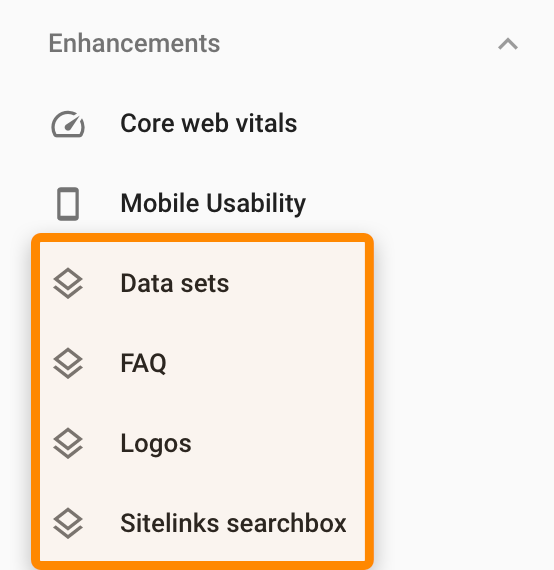
Then click to see the detailed information:
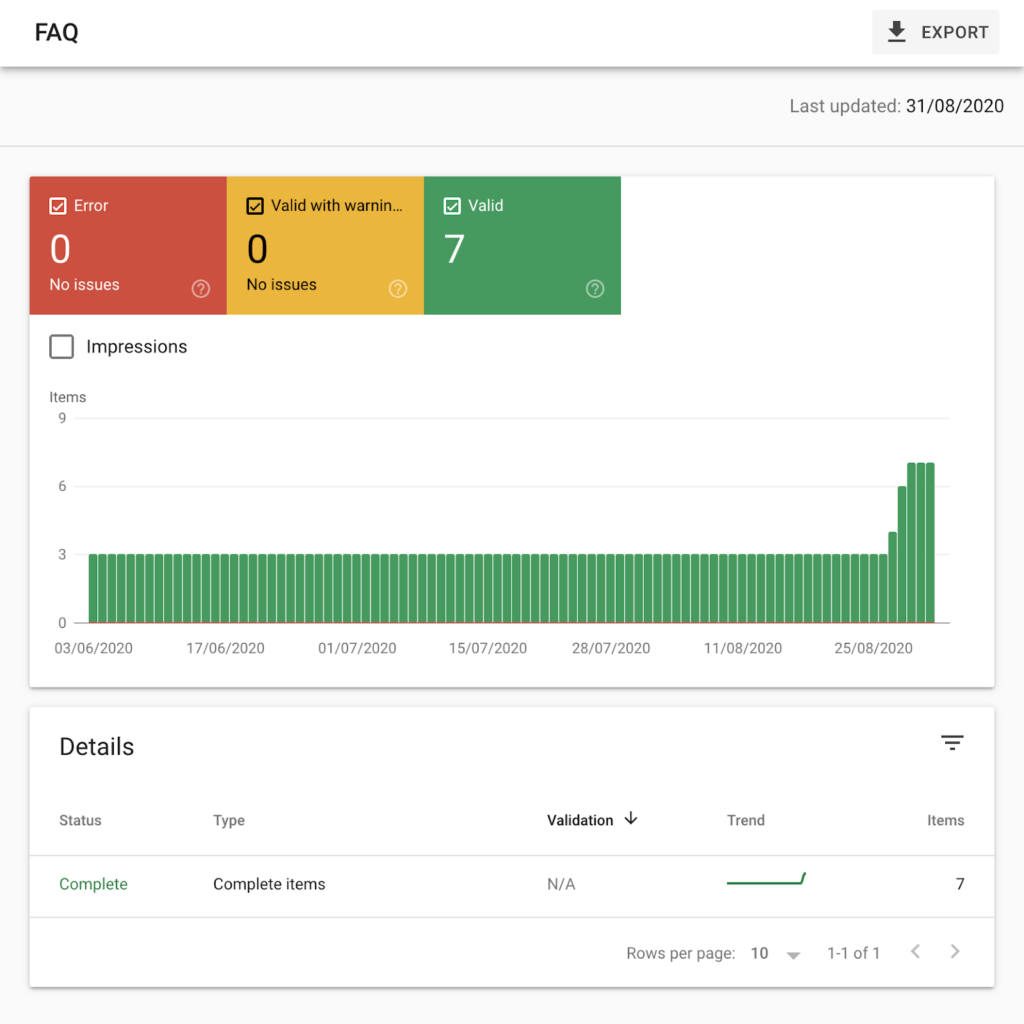
5 easily actionable tips to obtain rich snippets.
Now that you know how to add structured data tags to your site and understand what they correspond to, here are ten schemas to adopt on your site right now.
1. Add bullet-point lists
To get more pixels on your site, nothing could be simpler. If you want to obtain what is called position 0, add bullet-point lists to your content.
If you also want to have links that are more attractive than a simple URL / title / description, add images and/or videos. Google might choose an element to display to the right of your site in search results.
2. Create a Google My Business listing (Google Business Profile)
Formerly GMB, today the listing is called Google Business Profile (GBP). GBP allows you to improve your local SEO. But it also allows you to obtain more pixels on SERPs for brand searches and local searches.
For brand searches:
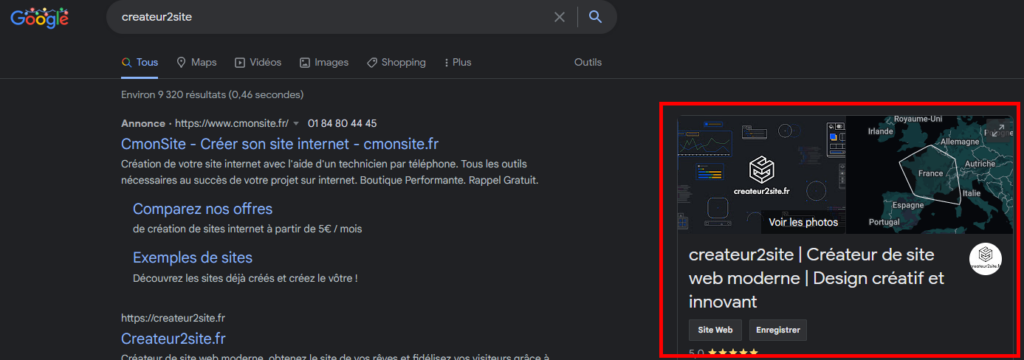
For local searches, you will appear in the form of a panel among your competitors:
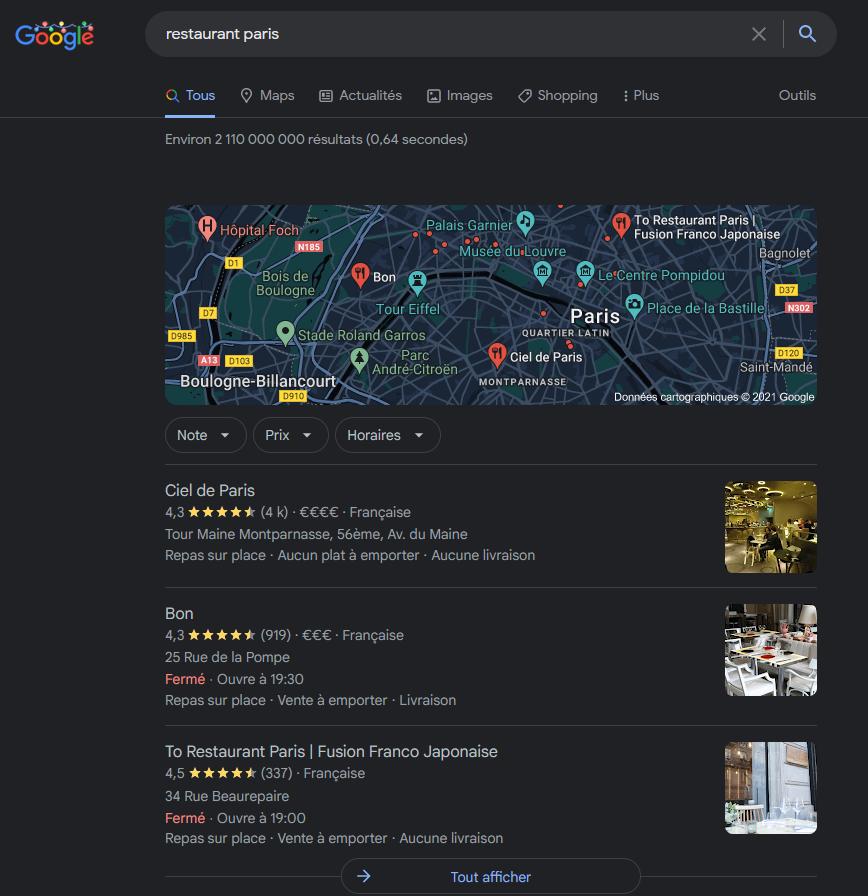
You will also have a Maps panel.
To do this, simply go to https://business.google.com/create and create your account. It is that simple.
3. Sitelinks
Sitelinks are links to other pages (or sections of a page) that appear beneath certain Google search results. They help users quickly access relevant information on a website.
Here is an example in a brand search:
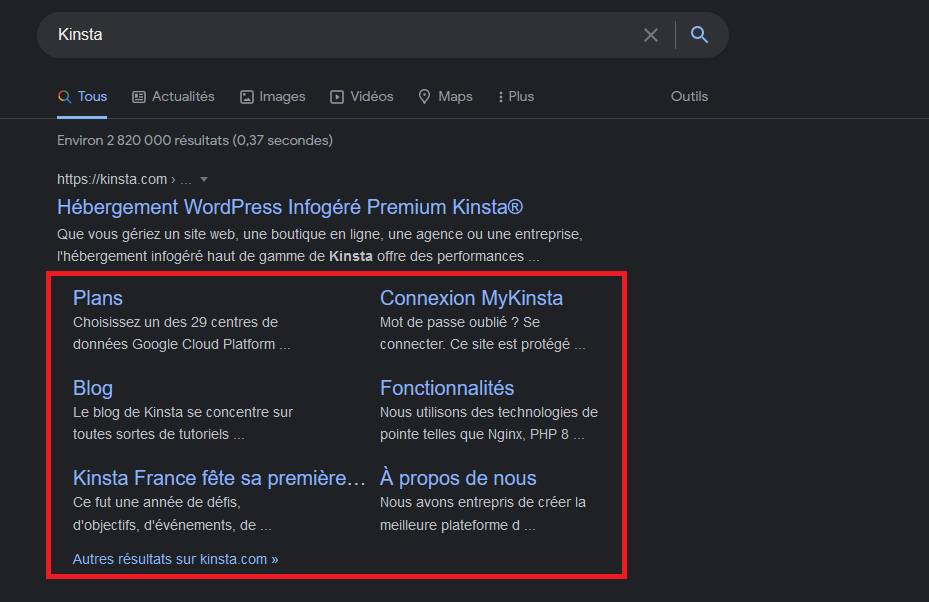
Sitelinks can also appear on non-brand search results:
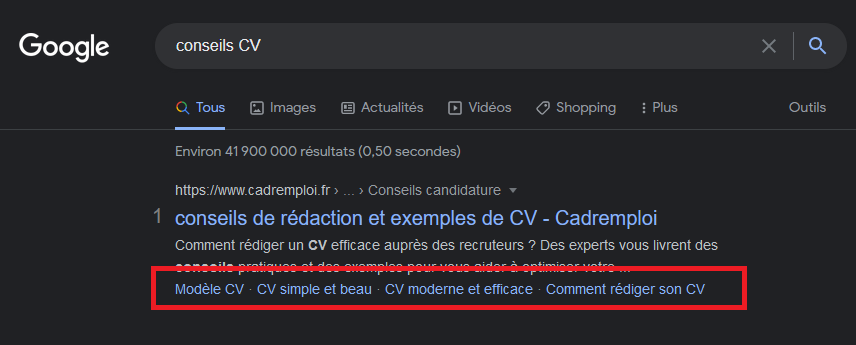
As with any way of gaining more pixels, this will allow you to obtain more clicks.
To achieve this:
- Site structure. Your website’s architecture plays a role in the display of sitelinks. In other words, avoid having a flat architecture.
- Internal linking. The way your pages are linked to other pages and the anchor text used will influence sitelinks. The same applies to the placement of links on the page and the breadcrumb trail.
- Removing the sitelinks search box. If you do not want the sitelinks search box to appear for your website, you can add the following tag to your home page:
<meta name="google" content="nositelinkssearchbox"/> - Usefulness and relevance. Think about different things that are useful for users and provide relevant results.
- Headings, and optionally a table of contents. Many one-line sitelinks have the same content as page headings.
4. The “organisation” markup
Organisation markup is suitable for any website. It allows you to give Google information such as your organisation’s name, phone number, and many other details.
Here is an example:
<script type="application/ld+json">
{ "@context" : "https://schema.org",
"@type" : "Organization",
"url" : "http://www.your-company-site.com",
"contactPoint" : [
{ "@type" : "ContactPoint",
"telephone" : "+1-401-555-1212",
"contactType" : "customer service"
} ] }
</script>
However, I strongly recommend going to schema.org/organization/ — you will have access to hundreds (yes, hundreds) of different structured data options for this type of schema.
By scrolling to the bottom of the page, you will find a line — clicking on JSON-LD will give you the result in HTML.

Then by clicking on JSON-LD:

You will also have access to something more visual by clicking on “structure”:

If structured data was once only for nerds, today it is very easy to implement.
5. Schema.org
To avoid repetition and ensure everyone gets something from this article — rather than listing all the different HTML codes — I recommend taking a look for yourself.
To do this, it is very simple: go to https://schema.org/docs/schemas.html and choose what suits you.
For example, let us choose structured data for local businesses:

After clicking, you will be redirected to what you need:

That is to say: the complete list of all possible schemas for this category.
By scrolling to the bottom of the page, you will always find examples:
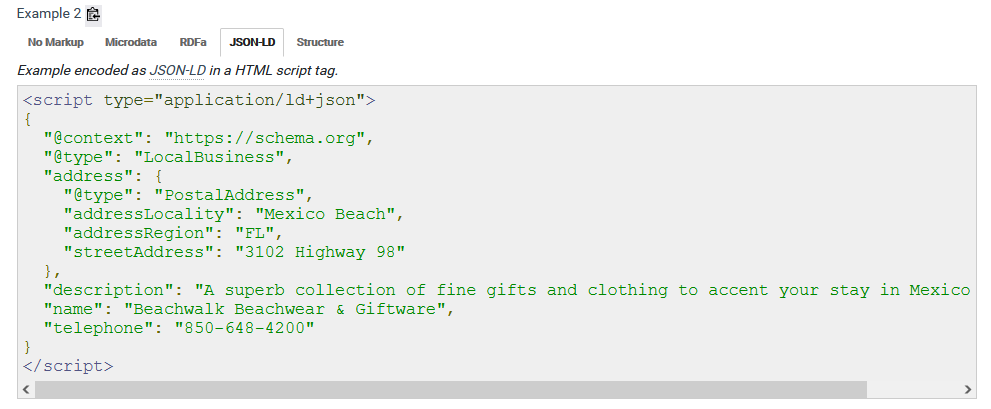
If you are unsure about what you are doing, simply use the Google tool cited earlier in the article to verify your structured data tags.
It really is that simple.
Do not know how? Not comfortable with code? Afraid of making mistakes? Not confident about what you are doing?
3 solutions:
- Ping me on Twitter or LinkedIn — I will try to reply
- Write a comment with your problem (less chance of me replying)
- Contact me and let us work together. I can handle it on your behalf.
In any case, if you enjoyed this article, feel free to share it and comment! Also, do not hesitate to suggest additions!