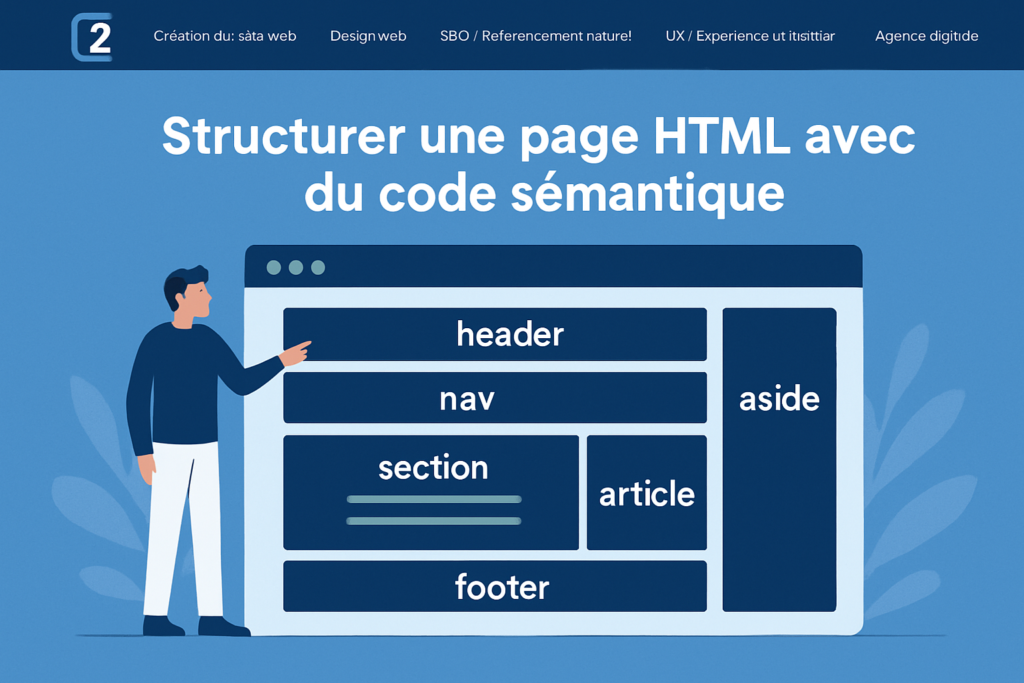
A semantic HTML tag provides search engines like Google or Bing with precise and clear information about the different sections of a web page. Since HTML5, it’s been possible to semantically tag the parts of your content.
Definition of a Semantic HTML Tag
A semantic HTML tag transfers semantic information to search engine crawlers — it gives an indication of meaning. For example, a <div> or <span> tag can be used for anything when building a web page. A semantic HTML tag, however, has a specific purpose — for example, the <article> tag was added to allow the precise delimitation of specific zones of your website.
Why Use Semantic HTML Markup?
Certainly, for human users, it’s easy to distinguish the menu from the content, the sidebar from ads, or a footer. For search engine crawlers, however, this is not at all as straightforward. By providing a clear structure, you improve search engines’ understanding and optimization of your crawl budget — this is what we call SEO (Search Engine Optimization).

Semantic HTML Tags for Structuring a Web Page
Semantic tags can provide precise information to crawlers — whether for different parts of your pages, or semantic meanings within content — such as the <strong> tag indicating that information is particularly important.
Site Header with <header>
A website’s header is defined with the <header> tag. It generally contains the site logo and main navigation menu. It tells indexing robots that the information in this tag will be recurring from page to page and is not representative of what the specific page is about.
Navigation Menus with <nav>
The <nav> tag indicates a navigation menu. A nav tag can be placed in the header but also inside other HTML tags if your website has multiple navigation menus — such as a footer menu or a sidebar menu.
Main Content with <main>
This element wraps the main content of the page. This is where you code your website’s content (the entire web page except header and footer) — it will contain HTML tags such as <section> and <article>, as well as <aside> tags.
Content with <article>
The <article> tag indicates the most important content element of the web page.
Example of semantic code with <article>:
<main>
<article>
  <h1></h1>
  Content
  [Additional content related to the article content]
</article>
[Additional content NOT related to the article content]
</main>
Creating Precise Structures with <section>
One of the only good uses of <section> is inside the <article> tag — when the article has chunks of text that have meaning as standalone blocks of information. The <section> tag can tell the machine that this block of content can be indexed as a fragment. A <section> tag can therefore appear at position 0 in Google search results (featured snippets).
Good code alone doesn’t get you to page 1 on Google — but if you have the necessary authority and legitimacy, good semantic code is the cherry on top. With a good semantic code structure, search engines can more easily extract the parts they need to enrich their search results.
Example of semantic code with <section>:
<article>
  <h1>SEO</h1>
  <p>SEO Definition</p>
  <section>
    <h2>How to do SEO?</h2>
    <p>Content about H2</p>
  </section>
  <section>
    <h2>SEO Glossary</h2>
    <p>Definitions of SEO terminology</p>
  </section>
  <section>
    <h2>How do algorithms work?</h2>
    <p>Content about H2</p>
  </section>
</article>
Supplementary Content with <aside>
Content within an <aside> tag covers anything not directly related to the main topic of the page. It can be placed inside an <article> or <main> tag — telling robots that this block of text is supplementary content. For example, a CTA in the middle of a blog post.
Footer with <footer>
The footer tag — or “pied de page” in French — is delimited by this tag. Like <header>, it also contains recurring content found on every page — such as the logo, navigation links or legal information.
Semantic Tags for Structuring Content
Headings with <h1> to <h6>
Heading tags indicate the major titles of your web page. They also structure your content and message. A subheading should go deeper into a parent heading. There’s therefore no reason to use an <h3> unless it’s covering a specific aspect of an <h2> in detail. <h5> and <h6> are rarely used since it’s uncommon to go that deep into detail — but if it’s coherent, use them.
As a simplification, use one and only one <h1> per page. However, if your page covers multiple topics, it may be acceptable to use multiple H1s if they’re placed in different semantic <section> tags. If you’re unsure, stick to the one H1 per page rule.
See all important HTML tags for SEO.
Description Lists <dl> <dt> <dd>
As the name suggests, description lists allow you to structure a list.
Example:
<dl>
  <dt>First name</dt>
  <dd>Stan</dd>
</dl>
Citations with <blockquote> and <cite>
<blockquote> is a semantic tag that clearly indicates you’re quoting something. The <cite> tag pairs with it to indicate who the quote comes from. <cite> should be placed inside the <blockquote> tag.
Formatting Code with <code> and <pre>
The <code> tag tells search engines (and users) that the content is a code snippet. The <pre> tag indicates preformatted code — meaning the snippet should preserve tabs, spaces and line breaks.
Semantic Markup and SEO
Clear and precise semantic markup primarily helps crawlers understand the meaning of a page without disrupting the topic.
For example, if your page links to other areas of your website that are not directly related to the page’s topic, an <aside> tag in a navigation menu can be valuable. This is sometimes something to address after a technical SEO audit if the site was poorly built.
Additionally, clarifying semantic elements could help Google better identify zones of your site for a more precise reasonable surfer model (PageRank — Topic-Sensitive PageRank). Think about adding life to your pages with semantic tags like HTML tables, bold and italic tags. Everything you can do to help Google understand your entire site and pages is a good thing — but this doesn’t tell Google your page or site is high quality simply by using good semantic HTML structure.
I don’t see this as a quality signal, but it certainly helps us better understand pages, so we can better display them for appropriate queries in search.
John Mueller (@JohnMu)
What Beginners Do That You Shouldn’t
If there are no semantically relevant HTML elements, use CSS or the few HTML elements that convey visual style without semantics. Most importantly, don’t use semantic HTML to dress up your web page if it’s not coherent. For example, don’t use a table to build a menu more easily.
To avoid all contradictions, follow Google’s guidelines:
- Don’t use tables for layout — use CSS instead to lay out the page.
- Don’t use heading elements (such as
<h1>and<h2>) to visually style text — use these elements only for hierarchically structured headings and use CSS for visual styling. - The
<em>tag indicates emphasis, not italics per se. Don’t use it to italicize something not meant to be emphasized — instead use<i>for non-accented italics. - The
<strong>tag indicates strong importance, not bold per se. To bold a word that doesn’t warrant strong importance, use the<b>element. - The
<br>tag is intended “only for line breaks that are actually part of the content, such as in poems or addresses.” Don’t use it to adjust line spacing — instead use elements like<p>to semantically mark text and CSS to adjust line spacing.
CSS Best Practices
Avoid styling semantic tags — use classes instead.
Example HTML: <h1>H1 Title</h1>
CSS: h1 {font-size:18px;}
This is a bad practice. Instead, prefer something like:
HTML: <h1 class="title">H1 Title</h1>
CSS: .title {font-size:18px;}
Semantic tags can be useful for a front-end developer to better understand their code — but most importantly, they should use semantic HTML so their web page is understandable to search engine crawlers, not just so the browser automatically styles the page.
Going Further with Microdata and Structured Data
The common vocabulary of schema.org has simplified the use of microdata. Commonly called structured data, these allow you to provide additional and precise information about a site or page’s content.
There are two main methods for microdata:
- Microdata in HTML markup (itemscope).
- Microdata in JSON-LD script.
With microdata, a site can achieve rich result displays on Google, Bing or Yahoo.
Summary
Not all semantic HTML tags are covered here. Tags like <address>, <data> and <sub> are, in my opinion, unnecessary. On one hand, Google doesn’t need an address tag to understand you’re referencing an address. On the other hand, SEOs have abused metadata — and Google no longer factors in these types of tags. Structured data (schema.org) exists if you want to specify precise details to search engines, such as your company’s address.